Last updated: May 2026. Running a craft brewery or winery is a beautiful, brutal balancing act — fermentation timelines, batch quality, distributor margins, taproom rush hours, retail compliance, and a thousand other moving parts. The single biggest reason indie beverage producers leak profit isn’t bad recipes or weak demand. It’s blind spots in their data.
This post walks through the Brewery & Winery Dashboard in Power BI — a 5-page, ready-to-use analytics template built specifically for craft beverage operators who want decision-grade clarity without paying $200–$1,500/month for SaaS reporting platforms. Used by thousands of breweries, wineries, and distilleries (and part of a template library trusted by 8,400+ teams across 40+ countries), it turns your sales export, batch log, and cost data into a single visual command center.
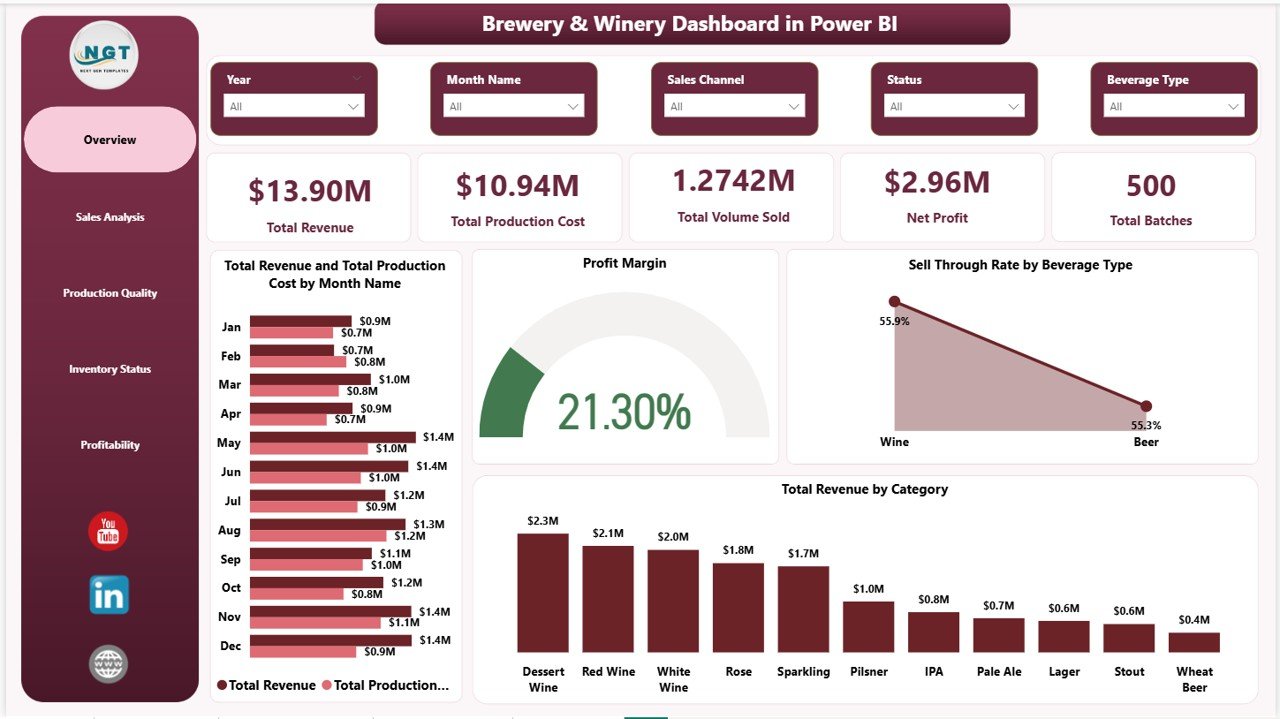
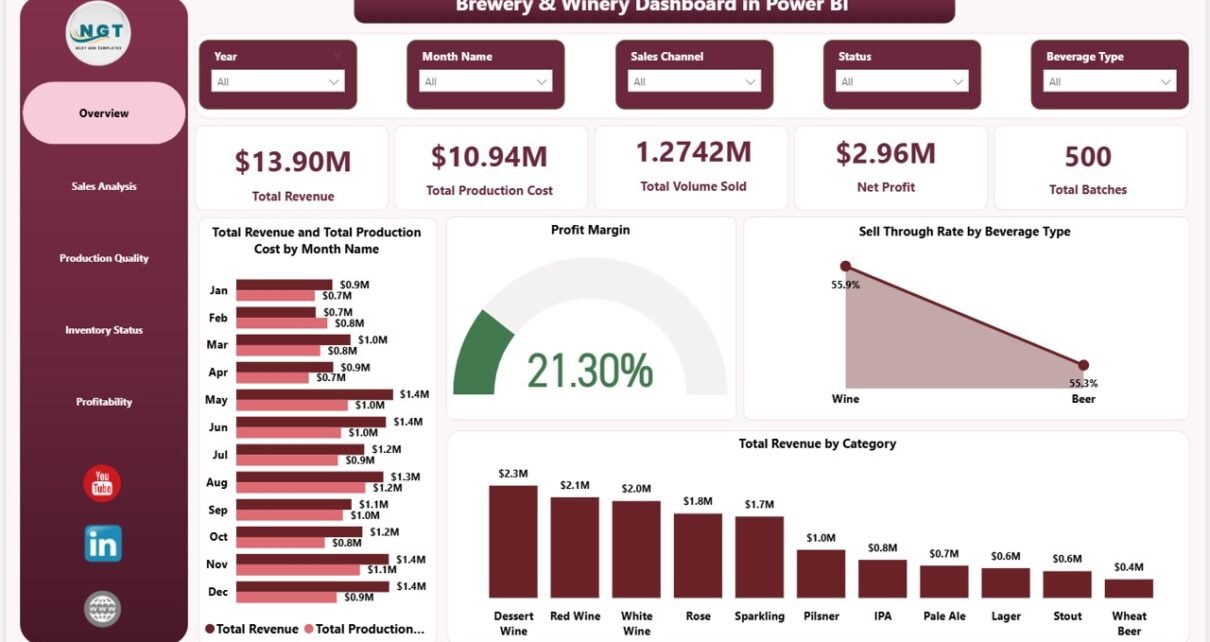
Brewery & Winery Dashboard in Power BI – Overview
👉 Click here to Purchase the Brewery & Winery Dashboard in Power BI
📊 Key Features at a Glance
- ✅ 5 fully designed Power BI report pages — Overview, Sales, Production Quality, Inventory, Profitability
- ✅ Pre-built KPI cards: Total Revenue, Production Cost, Volume Sold, Net Profit, Total Batches
- ✅ Slicer-based filtering for instant drill-down by region, sales channel, brewmaster, customer type, and beverage type
- ✅ DAX measures for Profit Margin, Sell-Through Rate, and Avg Quality Score
- ✅ Editable visuals — replace the sample dataset with your own and the entire report refreshes automatically
- ✅ Compatible with Power BI Desktop (free from Microsoft) and Power BI Service for cloud sharing
- ✅ One-time payment, lifetime access, free updates
📈 Dashboard Pages — Detailed Walkthrough
1. Overview Page
The Overview page is your 30-second decision dashboard. Five high-impact KPI cards sit at the top — Total Revenue, Total Production Cost, Total Volume Sold, Net Profit, and Total Batches — giving you and your operations manager an instant pulse on the business.
Below the cards, four analytical visuals tell the deeper story:
- Total Revenue and Total Production Cost by Month Name — A combined column-line chart that surfaces seasonality and reveals whether costs are climbing faster than revenue.
- Profit Margin — A trend visual showing how margin is moving over time, helping you separate pricing-driven shifts from cost-driven ones.
- Sell-Through Rate by Beverage Type — Highlights which beverages (IPA, Lager, Cabernet, Chardonnay, Rye, etc.) are moving fastest off the shelf.
- Total Revenue by Category — Breaks down earnings by product category so you know exactly where to double down.
2. Sales Analysis
The Sales Analysis page answers the question every founder eventually asks: “Which channel and which customer is actually paying us?”
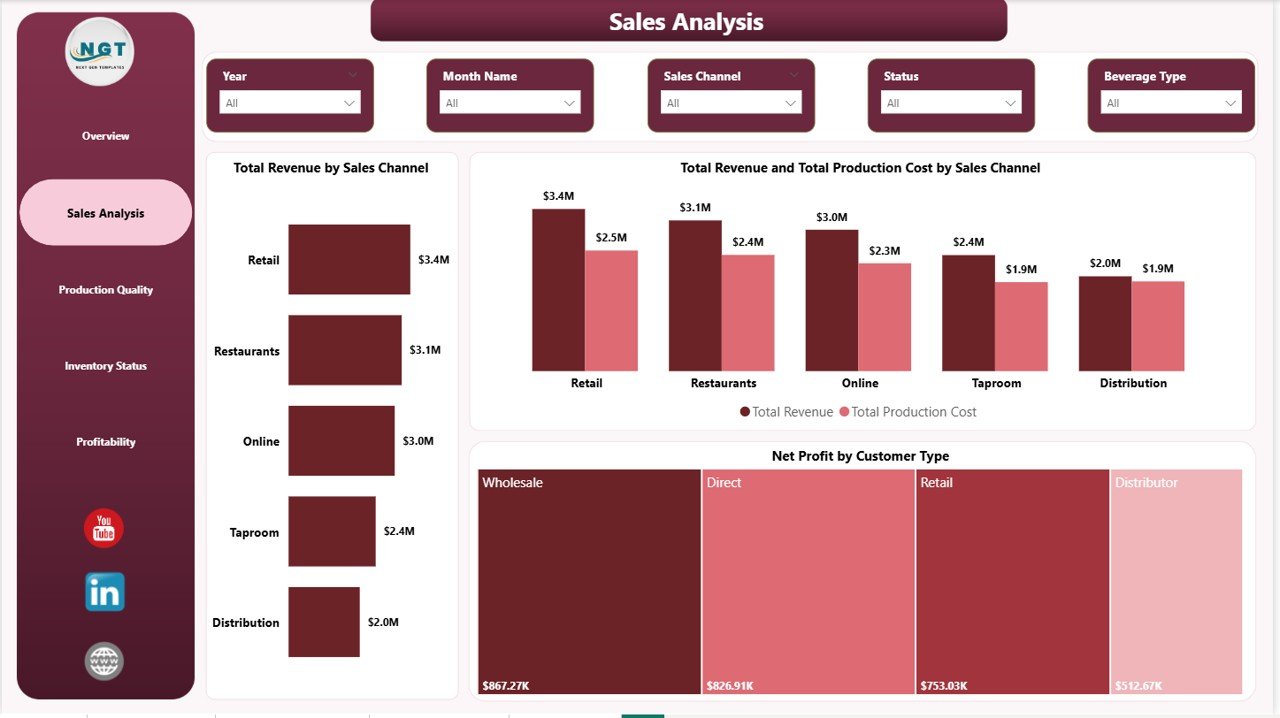
Sales Analysis
- Total Revenue by Sales Channel — Compares Taproom, Distributor, Retail, Online, and Wholesale revenue side by side.
- Total Revenue and Total Production Cost by Sales Channel — A dual-metric chart that flags channels with strong revenue but thin margins (the classic distributor trap).
- Net Profit by Customer Type — Quickly identifies whether trade buyers, on-premise accounts, or DTC customers are most profitable.
3. Production Quality
Quality consistency is the silent killer of craft beverage businesses. This page brings it into the open with three operational visuals:
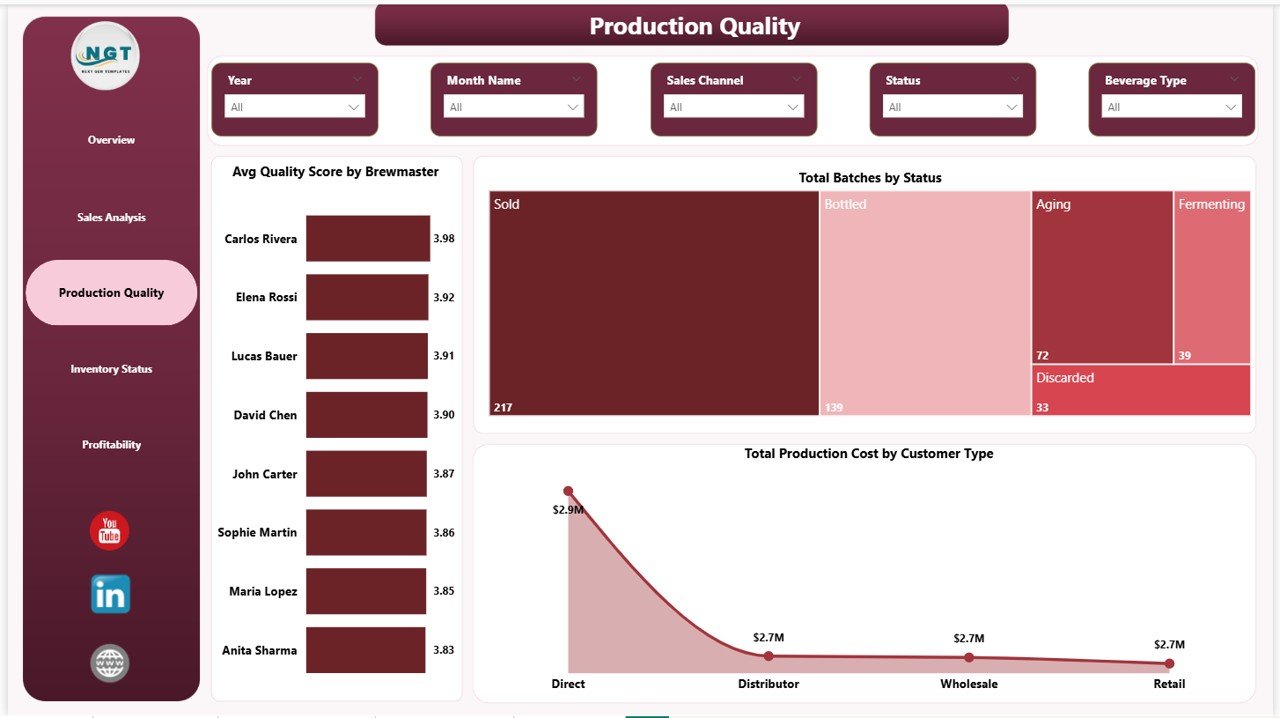
Production Quality
- Avg Quality Score by Brewmaster — Compares quality consistency across your team so you can coach or recognize performance objectively.
- Total Batches by Status — Tracks batches in Fermenting, Conditioning, Approved, Rejected, and Bottled stages — great for capacity planning.
- Total Production Cost by Customer Type — Reveals which customer segment is consuming the most production resources, often a hidden margin drag.
4. Inventory Status
The Inventory Status page is where supply chain meets production planning. It helps you answer: “Are we producing the right things, in the right place, at the right time?”
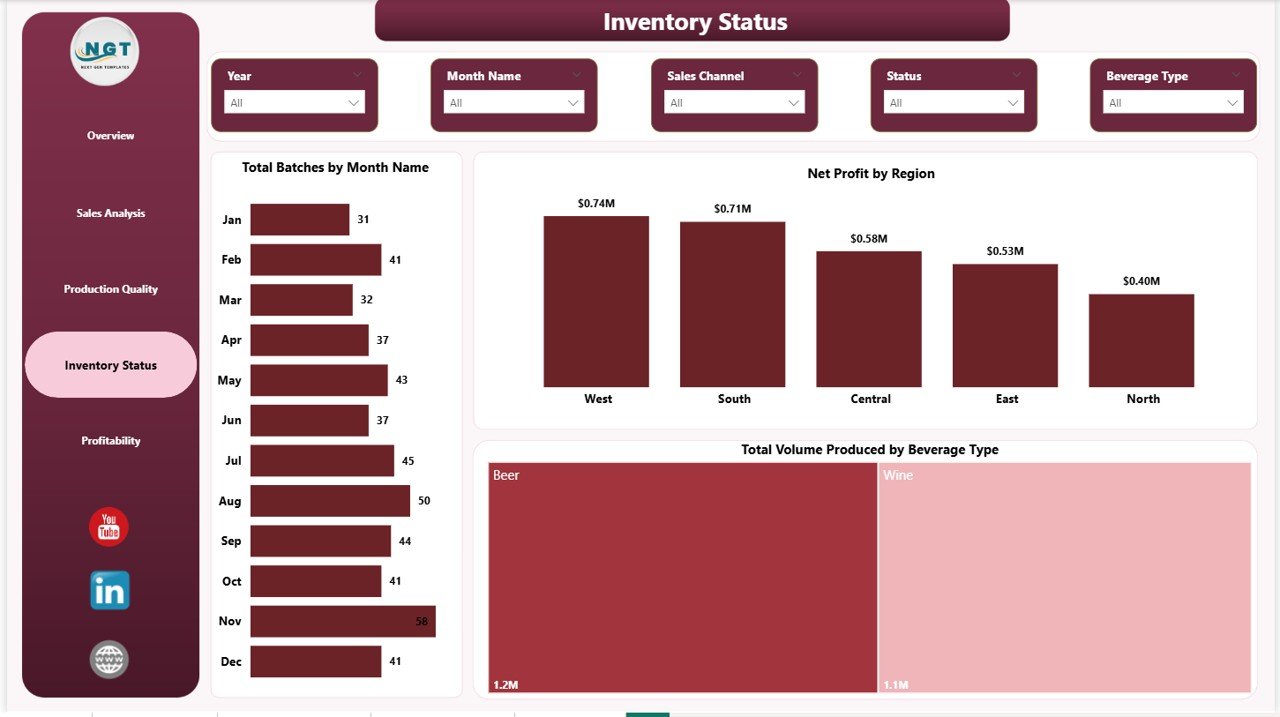
Inventory Status
- Total Batches by Month Name — Spot brewing or winemaking surges and quiet months that may justify a marketing or production push.
- Net Profit by Region — Compares regional performance for distribution decisions and territory planning.
- Total Volume Produced by Beverage Type — Helps balance the production mix with actual demand.
5. Profitability
The Profitability page closes the loop — converting all operational data into bottom-line clarity:
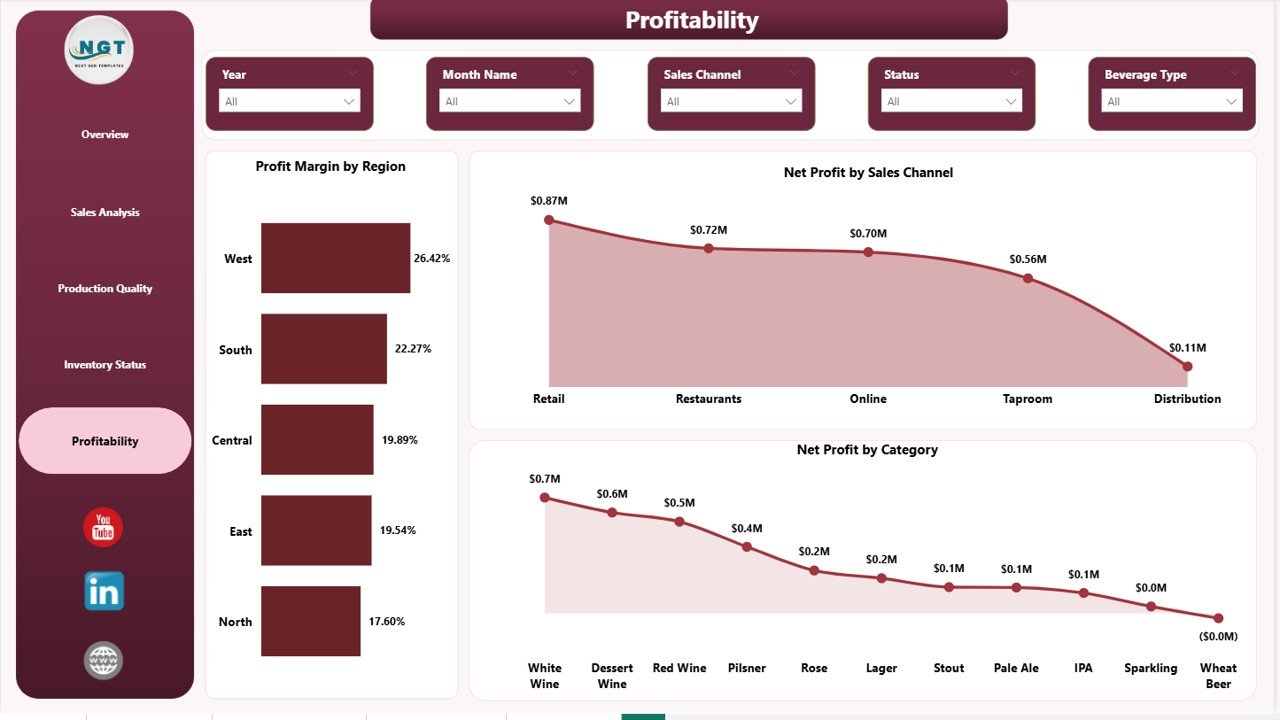
Profitability
- Profit Margin by Region — Find which regions deserve more sales investment and which need a margin rescue plan.
- Net Profit by Sales Channel — Tells you which channel actually drops dollars to the bottom line, not just revenue.
- Net Profit by Category — Shows which product categories are the real cash generators of the business.
🆚 Brewery & Winery Dashboard in Power BI vs Alternatives
| Feature | This Power BI Template | Custom Tableau / Qlik Build | Ekos / VinSUITE / Orchestrated SaaS |
|---|---|---|---|
| Pricing | $17.99 one-time | $2,500–$10,000 dev cost | $200–$1,500/month |
| Setup time | 5 minutes | 2–6 weeks | 2–4 weeks onboarding |
| Editable DAX | ✅ Fully editable | ⚠️ Developer dependent | ❌ Vendor locked |
| Pages included | 5 pre-built pages | Custom build only | Fixed templates |
| Slicers / filters | ✅ Built-in | ✅ Custom built | ✅ Limited |
| Quality Score by Brewmaster | ✅ Pre-modeled | ⚠️ Custom build | ⚠️ Add-on module |
| Lifetime access | ✅ Yes | ✅ With dev hand-off | ❌ Subscription only |
| Free updates | ✅ Yes | ❌ Billable | ✅ Subscription only |
👥 Who Should Use This Dashboard?
Ideal for:
- Craft brewery owners tracking production, sales, and profit in Power BI
- Wineries managing multiple beverage categories and sales channels
- Distilleries and cideries needing batch and quality tracking
- Beverage operations managers reporting to investors, banks, or partners
- Power BI consultants delivering analytics for craft beverage clients
Not ideal for:
- Pure DTC e-commerce sellers with no production operations
- Bars and pubs that don’t produce beverages in-house
- Teams without Power BI Desktop access — in that case, see the Excel version of the Brewery & Winery Dashboard
🎯 Real-World Use Cases
Case 1: 8-tank craft brewery in Colorado. A 6-employee brewery uses the Sales Analysis page to discover that distributor revenue looks strong on paper but margin is 11 percentage points lower than taproom sales. They shift focus to taproom events and lift profit by 18% in one quarter without raising prices.
Case 2: Family-run boutique winery in Napa. The Avg Quality Score by Brewmaster (used as Winemaker) lets the head winemaker compare batch quality consistency across two assistants. Targeted coaching tied to the dashboard reduces rejected batches by 22% over six months.
Case 3: Multi-site distillery group. The operations director uses Profit Margin by Region to identify a southern region underperforming by 9 points. A targeted distribution support program brings it back to the portfolio average within two quarters.
✨ Advantages
- Integrated view: production, sales, quality, inventory, and profitability in one place — not five spreadsheets.
- Cross-functional: the same dashboard works for the brewmaster, the sales lead, and the founder.
- Editable model: the .pbix file is fully unlocked. Add new measures, customize visuals, change colors to match your brand.
- Scalable: handles thousands of batch and sales rows without the slowdown you’d see in Excel.
- Cloud-ready: publish to Power BI Service and let your team view dashboards from a browser or phone.
⚠️ Opportunities for Improvement
The template is intentionally designed to cover the 80% of analytics needs every craft producer shares. A few areas you may want to extend yourself:
- TTB / excise tax tracking — add a regulatory KPI page if you ship across state lines.
- Forecasting — add Power BI’s built-in forecasting feature to the Net Profit and Revenue trend visuals.
- Tap-room foot-traffic data — if you have a POS or tap-list system feed, integrate it as a sixth page.
💡 Best Practices for Using This Dashboard
- Refresh weekly, not daily. Beverage data is noisy day-to-day; weekly refresh smooths out signal and saves time.
- Use slicers in pairs. Combine Region + Sales Channel to find under-served corridors fast.
- Annotate insights. Use Power BI’s comment feature to capture decisions next to the visual that triggered them.
- Schedule a 30-minute Friday review. One recurring meeting around this dashboard is worth more than ten ad-hoc reports.
- Pair with the Excel scorecard. Use the Excel version for offline reviews and the Power BI version for the boardroom screen.
📚 Explore Relevant Templates
If you found this dashboard useful, you may also want to look at these templates from NextGenTemplates.com:
- Brewery & Winery Dashboard in Excel — the Excel sister of this Power BI template.
- Distillery KPI Scorecard in Excel — traffic-light scorecard built for spirits producers.
- All Power BI dashboards — browse 600+ Power BI templates across HR, Finance, Manufacturing, and more.
- All Excel dashboards — the full Excel dashboard library.
❓ Frequently Asked Questions
Do I need to buy Power BI to use this template?
No. Power BI Desktop is free from Microsoft. You can open, edit, and refresh the .pbix file at no cost. Power BI Pro is only required if you want to share dashboards via the cloud Power BI Service.
Can I replace the sample data with my own brewery or winery data?
Yes. The data model is fully editable. Open the Transform Data editor in Power BI, point the source to your own CSV, Excel, or database export, and all visuals refresh automatically.
Will this work for a winery, distillery, or cidery — not just a brewery?
Yes. The data model uses generic fields (Beverage Type, Category, Batch, Sales Channel) that fit breweries, wineries, distilleries, meaderies, and cideries equally well.
Do I get future updates?
Yes. Free lifetime updates are included. New visualizations or DAX improvements are available to existing buyers at no extra cost.
What’s the difference between this and the Excel version?
The Excel version uses pivot tables and formulas — perfect if your team is already in Excel. The Power BI version is interactive, faster on large datasets, and ideal for sharing via Power BI Service.
Can I use this commercially?
Yes. You can use it inside your business, with your team, and present it to investors, banks, or partners. Reselling the template itself is not permitted.
👨💻 About the Author
Built by PK — Microsoft Certified Professional with 15+ years of Excel, VBA, Power BI, and Google Sheets experience. Founder of NextGenTemplates, reaching 300K+ subscribers across YouTube channels (@PK-AnExcelExpert, @NextGenTemplates, @NeoTechNavigators). Templates from NextGenTemplates.com are used by 8,400+ teams across 40+ countries, including breweries, wineries, distilleries, accounting firms, schools, and Fortune 500 finance teams.
📥 Conclusion — Get the Dashboard
Stop paying $200–$1,500/month for SaaS reporting platforms that lock you out of your own data. The Brewery & Winery Dashboard in Power BI gives you the same level of analytical clarity — across production, sales, quality, inventory, and profitability — for a one-time $17.99. Open it, plug in your data, and start making sharper decisions this week.
👉 Click here to Purchase the Brewery & Winery Dashboard in Power BI
✅ Instant download · One-time payment · No subscription · Lifetime access
📅 Last updated: May 2026
Visit our YouTube channel for step-by-step video tutorials: Youtube.com/@PK-AnExcelExpert