Part of the free Module 5: Excel Formulas and Functions · Function 17 of 102 · Full Excel course
The Excel COUNTIFS function counts the cells that satisfy two or more conditions at once, such as orders from one region that are also above a value or within a date range. COUNTIFS in Excel returns a whole number; when no row meets every condition it returns 0. All conditions are combined with AND logic.
COUNTIFS syntax
=COUNTIFS(criteria_range1, criteria1, [criteria_range2, criteria2], ...)Arguments
| Argument | Required | Meaning |
|---|---|---|
| criteria_range1 | Required | The first range to test. |
| criteria1 | Required | The condition applied to criteria_range1: a value, text, a comparison in quotes (“>100”) or a reference (“<>”&F1). |
| criteria_range2, criteria2 … | Optional | Up to 126 further range/condition pairs. Every range must have the same number of rows and columns as the first. |
Step-by-step example
With Region in A2:A100 and Status in E2:E100, count the delivered orders from the East region:
=COUNTIFS(A2:A100, "East", E2:E100, "Delivered")- Excel checks A2:A100 row by row for “East”.
- On the same rows it checks E2:E100 for “Delivered”.
- Each row that passes both tests adds 1 to the count.
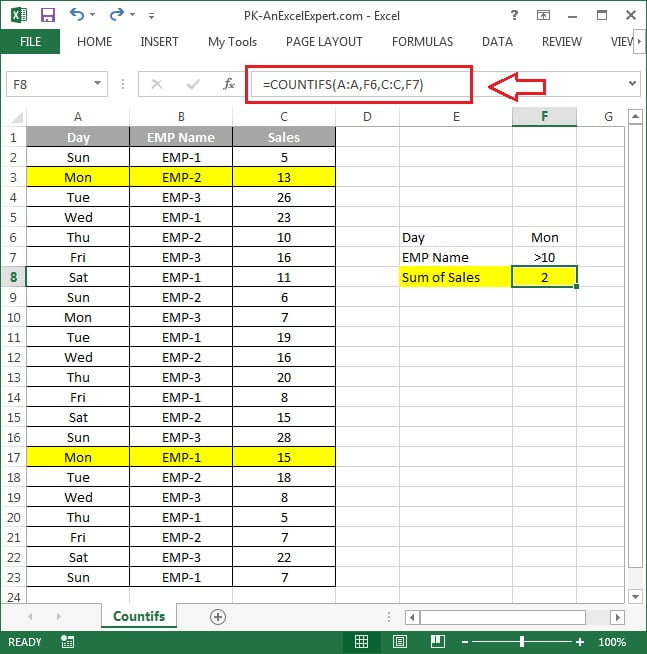
The screenshot below shows COUNTIFS counting records in a table where two columns must both match the criteria.
Practical use cases
1. Count values between two numbers
=COUNTIFS(D2:D100, ">=500", D2:D100, "<=1000")Both criteria point at the same range, which is allowed.
2. Date criteria
=COUNTIFS(C2:C100, ">="&DATE(2025,1,1), C2:C100, "<"&DATE(2025,2,1))Counts January 2025 records. Build the operator with & and a real date so the comparison is numeric. For today’s overdue items: "<"&TODAY().
3. Wildcards for partial text
=COUNTIFS(B2:B100, "*Pro*", A2:A100, "East")* stands for any number of characters, ? for exactly one. “???” counts entries that are exactly three characters long.
4. Count non-blank rows that are not cancelled
=COUNTIFS(E2:E100, "<>", E2:E100, "<>Cancelled")5. Duplicate check in a helper column
=COUNTIFS($A$2:$A$100, A2)>1Returns TRUE for any value that appears more than once, ready for conditional formatting.
Common mistakes and errors
- #VALUE! – the ranges are different sizes. Make every criteria_range the same dimensions.
- Count is 0 unexpectedly – numbers stored as text, leading spaces or a date typed inside quotes. Clean the data or use DATE().
- Trying OR logic – COUNTIFS is AND only. For “East or West” use
SUM(COUNTIFS(A2:A100, {"East","West"})). - Criteria longer than 255 characters – not supported. Shorten the text or use a helper column.
- Case sensitivity – COUNTIFS ignores case. Use SUMPRODUCT with EXACT for case-sensitive counts.
Tips and best practices
- Turn the range into a Table and reference Orders[Status]; the count grows with the data and the formula stays readable.
- Combine COUNTIFS with a helper cell for the current month: put EOMONTH(TODAY(),-1)+1 in one cell and EOMONTH(TODAY(),0) in another, then point both date criteria at them.
- Use COUNTIFS for KPI tiles. Open tickets, overdue invoices and delivered orders are each one COUNTIFS; format the cells large and you have a dashboard header.
- Check for hidden characters when a count looks low: =LEN(A2) versus =LEN(TRIM(A2)) reveals stray spaces from imports.
- Prefer COUNTIFS over COUNTIF even for one condition; it is easier to add a second criterion later.
Related functions
- COUNTIF – single-condition count.
- SUMIFS – same criteria rules, but adds values instead of counting.
- AVERAGEIF – conditional average.
- SUMPRODUCT – for OR logic and case-sensitive counts.
- See more in the Excel Formulas hub.
Frequently asked questions
What is the difference between COUNTIF and COUNTIFS?
COUNTIF accepts exactly one range and one condition. COUNTIFS accepts up to 127 range and condition pairs and counts only the rows where every condition is true.
How do I count between two dates with COUNTIFS?
Point two criteria at the same date column: “>=”&start_date and “<=”&end_date, using real dates from cells or the DATE function.
Can COUNTIFS count with OR conditions?
Not on its own. Wrap it in SUM with an array constant, for example SUM(COUNTIFS(A2:A100, {“East”,”West”})), or add two COUNTIFS formulas.
Need a ready-made template? Browse 7,000+ Excel, Power BI and Google Sheets templates at NextGenTemplates.com.