Part of the free Module 5: Excel Formulas and Functions · Function 18 of 105 · Full Excel course
The Excel DATE function builds a valid date from three separate numbers: a year, a month and a day. It returns the date as a serial number that Excel displays as a date when the cell is formatted accordingly. DATE is the safe way to construct dates inside formulas, because it adjusts automatically when the month or day value runs past the end of a month or year.
Syntax
=DATE(year, month, day)Arguments
| Argument | Required / Optional | Meaning |
|---|---|---|
| year | Required | The year as one to four digits. Values from 1900 to 9999 are used as typed. Values from 0 to 1899 are added to 1900, so DATE(26,9,4) returns 4 September 1926, not 2026. Always use four-digit years. |
| month | Required | The month number. Values above 12 roll into the following year; 0 or negative values roll back into the previous year. |
| day | Required | The day number. Values above the days in the month roll into the next month; 0 returns the last day of the previous month. |
How DATE works
Excel stores dates as the number of days since 1 January 1900, so DATE simply calculates that serial number. The rollover behaviour is deliberate and useful: =DATE(2026,13,1) returns 1 January 2027, =DATE(2026,3,0) returns 28 February 2026 and =DATE(2026,1,45) returns 14 February 2026. A year below 0 or above 9999 returns #NUM!. Any argument that is not a number returns #VALUE!.
Step-by-step example
The screenshot shows DATE assembling a date from year, month and day values held in separate columns.
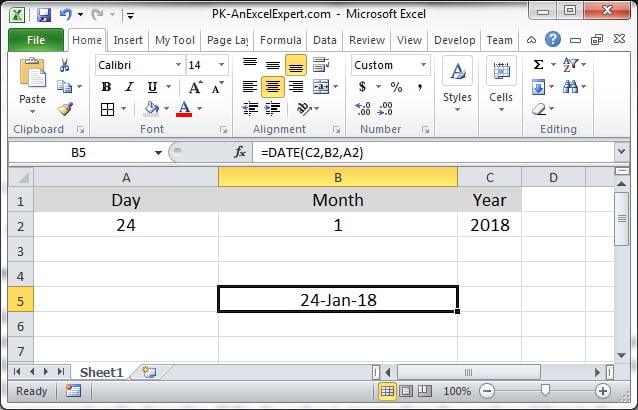
- Enter the year in A2, the month in B2 and the day in C2, for example 2026, 9 and 4.
- In D2 enter
=DATE(A2,B2,C2)and press Enter. - If D2 shows a number such as 46269, apply a date format with Ctrl+Shift+3 or Home > Number Format > Short Date.
- Fill the formula down. Change B2 to 14 and notice that the result rolls forward to February 2027.
Practical use cases
1. First and last day of the month
=DATE(YEAR(A2),MONTH(A2),1)
=DATE(YEAR(A2),MONTH(A2)+1,0)
The second formula uses day 0 of the next month to return the last day of the current month, equivalent to EOMONTH(A2,0).
2. Convert an 8-digit text date
=DATE(LEFT(A2,4),MID(A2,5,2),RIGHT(A2,2))Turns 20260904 into a real date. LEFT, MID and RIGHT return text, but DATE converts numeric text automatically.
3. This year’s anniversary of a date
=DATE(YEAR(TODAY()),MONTH(A2),DAY(A2))4. Add a number of months or years
=DATE(YEAR(A2)+1,MONTH(A2)+6,DAY(A2))Adds 18 months. For month arithmetic that clips to month ends, EDATE is more precise.
5. Fix dates with swapped day and month
=DATE(YEAR(A2),DAY(A2),MONTH(A2))Common mistakes and tips
- Two-digit years: DATE(26,1,1) is 1926. Always pass four digits, or add 2000 to a two-digit source.
- Result looks like a number: the cell is in General format. Apply a date format; the value itself is correct.
- Typing dates as text: “09/04/2026” is read differently on US and UK systems. DATE(2026,9,4) is unambiguous and should be used in formulas instead.
- #NUM! error: the resulting year is outside 0 to 9999, usually from a very large month or day value.
- Google Sheets: DATE behaves the same way, including rollover, so formulas transfer without change.
DATE compared with DATEVALUE, EDATE and EOMONTH
DATE constructs a date from numbers; DATEVALUE converts a text date such as “4 Sep 2026” into a serial number. Use DATE when the parts are already numeric or extracted with LEFT, MID and RIGHT, and DATEVALUE when a whole text date must be parsed. EDATE and EOMONTH shift an existing date by months, with EDATE keeping the day and EOMONTH snapping to the month end; DATE can do the same with arithmetic but does not clip 31 January plus one month to 28 February the way EDATE does. In practice DATE is the building block, and the other three are shortcuts for the most common date manipulations.
Related functions
- DATEVALUE: converts a text date into a serial number.
- EDATE: adds or subtracts months from a date.
- EOMONTH: returns the last day of a month.
- YEAR: extracts the year that DATE recombines.
- See all lessons in the Excel Formulas course.
Frequently asked questions
Why does DATE return a number instead of a date?
The cell is formatted as General, so Excel shows the serial number. Apply any date format and the same value displays as a date.
What happens if the month is greater than 12 in DATE?
The extra months roll into the following year, so DATE(2026,14,1) returns 1 February 2027. Day values roll over in the same way.
Why does DATE(26,9,4) return 1926?
Years from 0 to 1899 are added to 1900. Use four-digit years such as 2026 to avoid the problem.
Need a ready-made template? Browse 7,000+ Excel, Power BI and Google Sheets templates at NextGenTemplates.com.