Vendor management plays a critical role in every organization. Businesses depend on suppliers for raw materials, services, logistics, and operational support. Therefore, companies must evaluate vendors carefully. However, many organizations still manage vendor evaluations using emails and scattered notes. As a result, they miss deadlines, overlook performance gaps, and struggle to maintain accountability.
So, how can you track vendor review tasks, responsible persons, deadlines, and evaluation progress in one structured system?
The answer is simple.
You need a Vendor Evaluation Planner Checklist in Excel.
In this comprehensive guide, you will learn:
-
What a Vendor Evaluation Planner Checklist in Excel is
-
Why vendor evaluation planning is important
-
Detailed explanation of both worksheets
-
Key benefits of using this checklist template
-
Advantages of Vendor Evaluation Planner Checklist in Excel
-
Best Practices for Vendor Evaluation Planner Checklist
-
Frequently Asked Questions with Answers
Let’s explore everything step by step.
Click to Purchases Vendor Evaluation Planner Checklist in Excel
What Is a Vendor Evaluation Planner Checklist in Excel?
A Vendor Evaluation Planner Checklist in Excel is a ready-to-use task management template designed to help procurement teams and business managers evaluate suppliers systematically.
It allows you to:
-
Track vendor assessment activities
-
Assign responsibilities clearly
-
Set evaluation deadlines
-
Monitor completion status
-
Measure checklist progress visually
Because the template uses Excel, users can manage data easily. Moreover, teams can customize it based on company requirements. Therefore, organizations can create a structured vendor evaluation process without using complex software.
Why Is Vendor Evaluation Important for Businesses?
Vendor performance directly affects product quality, delivery timelines, and customer satisfaction. If suppliers delay shipments or compromise quality, the business suffers.
Therefore, companies must evaluate vendors regularly.
Vendor evaluation helps you:
-
Maintain supply chain stability
-
Reduce operational risks
-
Improve supplier relationships
-
Control procurement costs
-
Ensure compliance with quality standards
However, without a structured checklist, teams forget critical review points. Consequently, vendor evaluation becomes inconsistent.
That is why a Vendor Evaluation Planner Checklist in Excel becomes essential.
Click to Purchases Vendor Evaluation Planner Checklist in Excel
Key Features of Vendor Evaluation Planner Checklist in Excel
This template contains 2 structured worksheets. Each worksheet serves a specific purpose.
Let’s understand them in detail.
1️⃣ Vendor Evaluation Planner Checklist Sheet (Main Sheet)
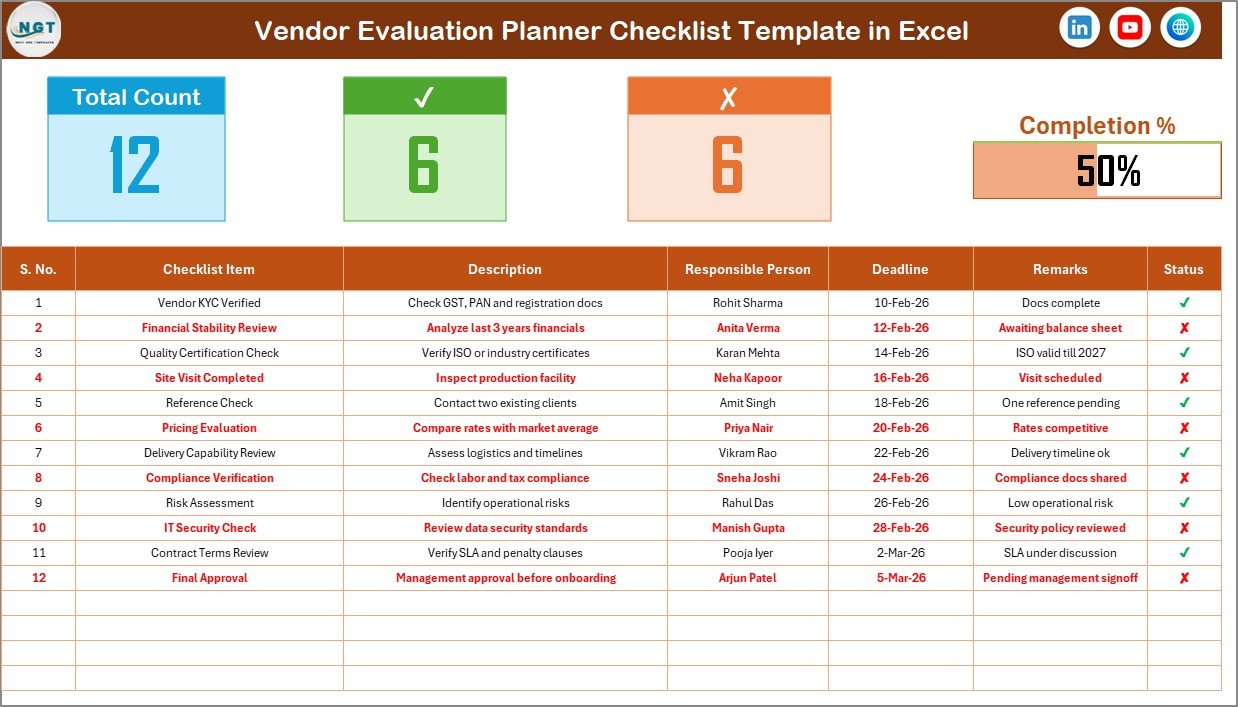
This is the primary worksheet where you capture all checklist information.
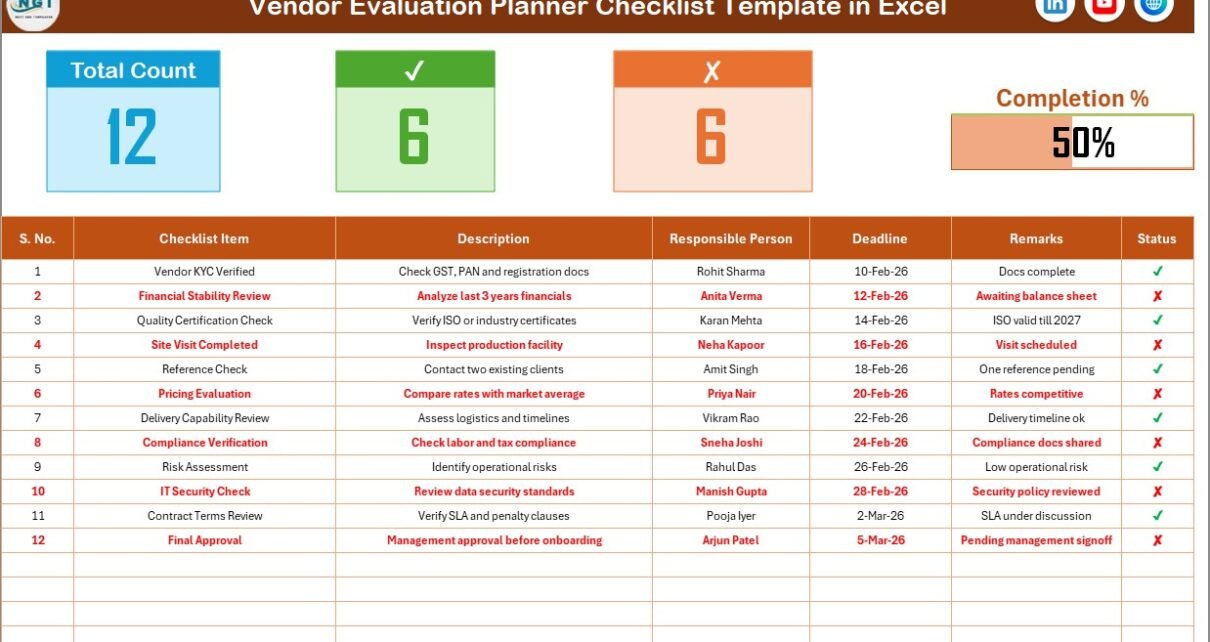
Top Section – Dashboard Overview
At the top of the sheet, you will find a summary section that displays:
-
Total Count
-
Checked Count (✔)
-
Crossed Count (✘)
-
Progress Bar showing Checked %
Because of this section, you can instantly see how much evaluation work your team has completed.
For example:
-
If Total Items = 20
-
Checked = 15
-
Crossed = 5
The progress bar automatically shows 75% completion.
Therefore, managers can track evaluation progress visually without reading every row.
Checklist Table – Core of the Template
Below the summary section, you will find the main checklist table.
This table includes the following columns:
Serial No.
Shows the sequence number of each checklist item.
Checklist Item
Defines the evaluation activity.
For example:
-
Review contract terms
-
Verify delivery performance
-
Assess product quality
Description
Provides brief details about the task.
Responsible Person
Assigns accountability to a specific team member.
Deadline
Specifies the target date for task completion.
Remarks
Allows users to add comments or observations.
Status
Here, you simply select:
-
✔ (Completed)
-
✘ (Pending or Not Approved)
Because of this simple status control, the template automatically updates summary metrics and progress bar.
2️⃣ List Sheet Tab
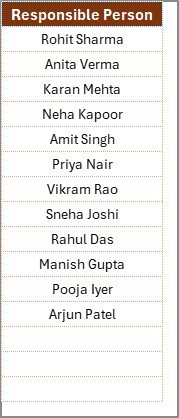
This worksheet stores a unique list of Responsible Persons.
The template uses this list to create a drop-down menu in the main checklist table.
Therefore:
-
You avoid typing errors
-
You maintain consistent naming
-
You simplify user input
If you want to add a new team member, simply add the name to the List sheet. The drop-down automatically updates.
Click to Purchases Vendor Evaluation Planner Checklist in Excel
How Does the Progress Bar Work?
The progress bar calculates:
Then it converts the result into percentage.
Because of this visual representation:
-
Teams stay motivated
-
Managers monitor efficiency
-
Deadlines remain visible
Moreover, progress visibility improves accountability across departments.
Who Should Use Vendor Evaluation Planner Checklist?
This template suits:
-
Procurement Managers
-
Supply Chain Teams
-
Operations Managers
-
Quality Control Teams
-
Finance Departments
-
Small Business Owners
Therefore, both large organizations and small businesses can use this Excel-based solution.
Click to Purchases Vendor Evaluation Planner Checklist in Excel
How to Use Vendor Evaluation Planner Checklist in Excel?
Follow these simple steps:
Step 1: Open the Checklist Sheet
Review the summary dashboard at the top.
Step 2: Add Checklist Items
Enter evaluation tasks in the Checklist Item column.
Step 3: Assign Responsible Person
Select name from drop-down list.
Step 4: Set Deadline
Enter due date for each task.
Step 5: Update Status
Mark ✔ when task completes. Mark ✘ when task remains pending.
As you update the status, the progress bar changes automatically.
Therefore, you always know your evaluation stage.
What Are Common Vendor Evaluation Checklist Items?
You can include tasks such as:
-
Contract compliance verification
-
Delivery timeliness review
-
Quality inspection report
-
Pricing comparison analysis
-
Financial stability check
-
Regulatory compliance review
-
Communication effectiveness assessment
-
Performance scorecard review
Because vendor evaluation varies across industries, you can customize the checklist accordingly.
Click to Purchases Vendor Evaluation Planner Checklist in Excel
Advantages of Vendor Evaluation Planner Checklist in Excel
Let’s explore the major benefits.
1️⃣ Structured Vendor Assessment
This template organizes evaluation tasks clearly. Therefore, you avoid confusion.
2️⃣ Clear Accountability
You assign responsible persons for each task. Consequently, team members take ownership.
3️⃣ Visual Progress Monitoring
The progress bar provides instant performance insight.
4️⃣ Simple Status Control
You only need to mark ✔ or ✘. As a result, data entry becomes easy.
5️⃣ Customizable Design
You can modify checklist items according to company policy.
6️⃣ No Complex Software Required
Since the template works in Excel, you avoid expensive tools.
7️⃣ Improved Vendor Performance
Regular evaluation improves supplier accountability. Therefore, long-term vendor relationships become stronger.
Best Practices for Vendor Evaluation Planner Checklist
To maximize results, follow these best practices.
1️⃣ Define Clear Evaluation Criteria
Write checklist items clearly and specifically.
2️⃣ Set Realistic Deadlines
Avoid unrealistic timelines that reduce accountability.
3️⃣ Update Status Regularly
Do not wait until month-end. Update tasks as soon as they complete.
4️⃣ Review Progress Weekly
Check the progress bar frequently.
5️⃣ Standardize Responsible Persons
Maintain updated names in List sheet.
6️⃣ Archive Completed Evaluations
Save historical records for performance comparison.
7️⃣ Conduct Vendor Review Meetings
Use the checklist during vendor meetings to discuss gaps.
By following these practices, you improve supplier management significantly.
Click to Purchases Vendor Evaluation Planner Checklist in Excel
How Does This Checklist Improve Vendor Management?
This template transforms vendor evaluation from an informal process into a structured system.
Instead of relying on memory:
-
Teams follow defined steps
-
Managers monitor progress visually
-
Responsibilities remain clear
-
Evaluation deadlines stay controlled
Therefore, procurement processes become professional and reliable.
Why Choose Excel for Vendor Evaluation Planning?
Excel provides:
-
Flexibility
-
Easy customization
-
Automatic calculations
-
Drop-down validation
-
Visual formatting options
Moreover, most teams already use Excel. Therefore, implementation becomes smooth and cost-effective.
Conclusion
Vendor evaluation directly affects supply chain success. However, many organizations lack structured evaluation tools. As a result, performance monitoring becomes inconsistent.
The Vendor Evaluation Planner Checklist in Excel offers:
-
Organized checklist tracking
-
Assigned responsibilities
-
Clear deadlines
-
Visual progress monitoring
-
Simple ✔ and ✘ status updates
-
Drop-down list control
Because of its simplicity and structure, this template helps businesses maintain strong vendor relationships and improve procurement performance.
If you want to streamline supplier evaluations and improve accountability, this checklist provides the perfect solution.
Click to Purchases Vendor Evaluation Planner Checklist in Excel
Frequently Asked Questions (FAQs)
1️⃣ What is Vendor Evaluation Planner Checklist in Excel?
It is a ready-to-use Excel template that helps organizations track vendor evaluation tasks systematically.
2️⃣ Can I customize checklist items?
Yes. You can add, edit, or remove checklist items based on your business needs.
3️⃣ How does the progress bar calculate completion?
The progress bar calculates completed tasks divided by total tasks and shows percentage completion.
4️⃣ Can I add more responsible persons?
Yes. Simply add new names in the List sheet. The drop-down updates automatically.
5️⃣ Is this template suitable for small businesses?
Yes. Small businesses can easily use this Excel-based tool for vendor management.
6️⃣ Do I need advanced Excel skills to use this template?
No. You only need basic Excel knowledge to update checklist items and status.
7️⃣ How often should I evaluate vendors?
You should evaluate vendors quarterly or annually depending on business requirements.
Click to Purchases Vendor Evaluation Planner Checklist in Excel
Visit our YouTube channel to learn step-by-step video tutorials