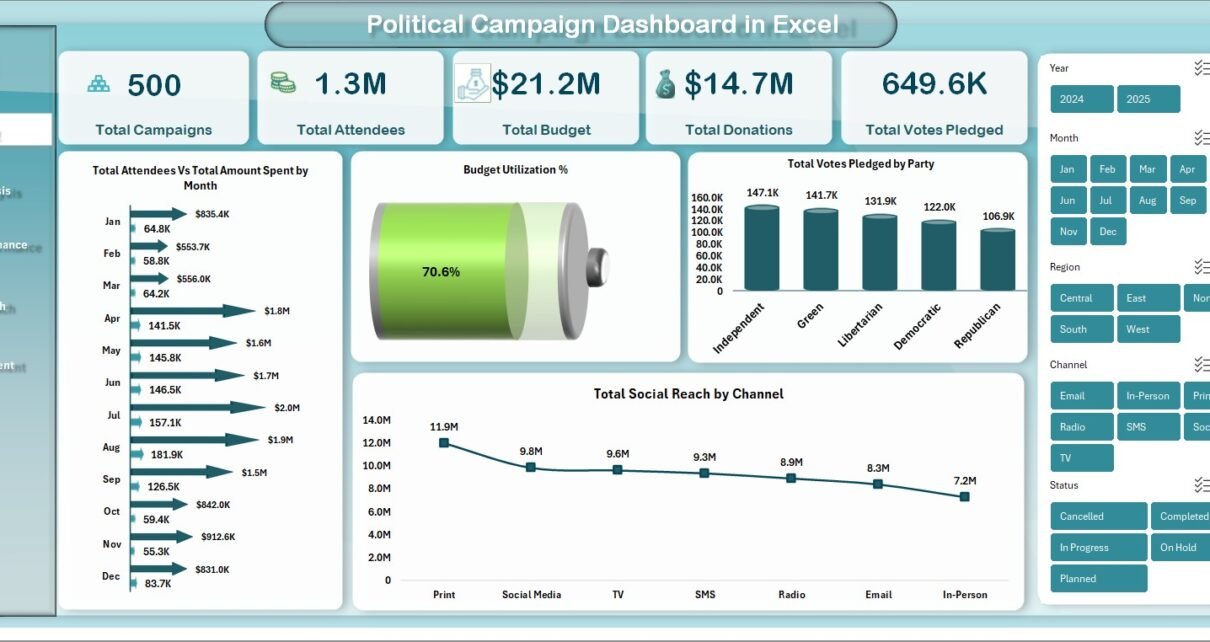
The Political Campaign Dashboard in Excel tracks 5 headline campaign KPIs across 5 interactive dashboard pages, with 14+ pre-built pivot charts, a structured Data Sheet, and a Support Sheet that powers everything dynamically. Setup takes under 10 minutes — just paste your campaign records into the Data Sheet, click Refresh All, and every KPI card, chart, and slicer on the Overview, Regional Analysis, Candidate Performance, Voter Outreach, and Fund Management pages updates automatically.
🌍 Join 8,400+ teams in 40+ countries using NextGenTemplates to replace paid SaaS tools with one-time-purchase Excel, Google Sheets, Power BI, and HTML templates.
✅ Instant download · One-time payment · No subscription · No per-user fees · Lifetime access
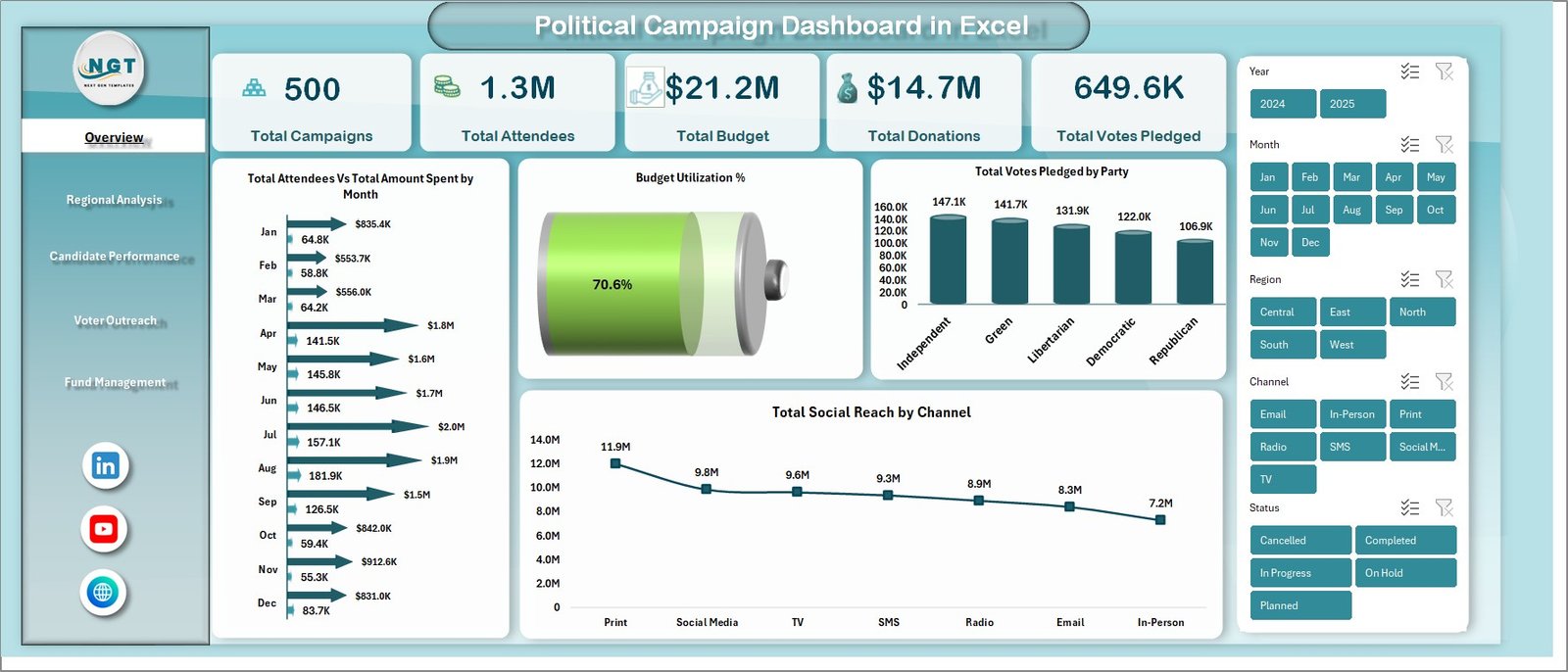
Political Campaign Dashboard in Excel — Overview Page
Introduction
Modern political campaigns generate enormous amounts of operational data — donations, voter pledges, attendance at rallies, social-channel reach, constituency-level performance, and ever-shifting budgets. According to the U.S. Federal Election Commission, U.S. political committees raised over $15.9 billion in the 2024 cycle, and the campaigns that won were almost always the ones that turned that data into clear, weekly decisions instead of letting it sit in spreadsheets.
The Political Campaign Dashboard in Excel is built for exactly that. It is a single Excel workbook that consolidates campaigns, candidates, parties, donations, voter outreach, and fund management into a fully pivot-driven, slicer-filtered analytics tool. It works for a local council race, a state-assembly campaign, a national party operation, or a political consultant managing multiple clients — all from one file, with no macros, no add-ins, and no monthly software fees. Pair it with the broader Excel Dashboard Templates library on NextGenTemplates if you also need adjacent reporting tools for fundraising, events, or marketing.
Key Features of Political Campaign Dashboard in Excel
🔹 5 interactive dashboard pages — Overview, Regional Analysis, Candidate Performance, Voter Outreach, and Fund Management — each focused on a specific decision-making angle. Together they cover every operational lever a campaign manager pulls during a typical election cycle.
🔹 5 KPI cards on the Overview page — Total Campaigns, Total Attendees, Total Budget, Total Donations, and Total Votes Pledged. Each card recalculates instantly when you replace the sample records on the Data Sheet with your own.
🔹 14+ pivot-powered charts across the 5 dashboard pages, including Total Attendees Vs Total Amount Spent by Month, Budget Utilization %, Total Votes Pledged by Party, Total Social Reach by Channel, Net Fund Balance Amt by Party, and many more.
🔹 Multiple slicers on every page — filter the entire dashboard instantly by party, region, candidate, voter segment, event type, or campaign type. One click drives the whole workbook.
🔹 Structured Data Sheet with pre-formatted columns for campaign, candidate, party, region, state, constituency, voter segment, event type, channel, attendees, budget, amount spent, donations, and votes pledged.
🔹 Hidden Support Sheet housing every pivot table — refresh once via Data → Refresh All and every chart, KPI, and slicer rebuilds automatically.
🔹 Works on Excel for Windows, Mac, and Excel for the web. No macros, no VBA, no add-ins, and no internet connection required after download. It runs in locked-down corporate environments where the IT team blocks everything.
Dashboard Pages Explanation
1. Overview Page — The cross-campaign command center. At the top, 5 KPI cards display Total Campaigns, Total Attendees, Total Budget, Total Donations, and Total Votes Pledged. Below the cards, four charts deliver the high-level read: Total Attendees Vs Total Amount Spent by Month shows whether your event-spend curve is keeping pace with crowd growth; Budget Utilization % tracks how much of allocated funds you have actually deployed; Total Votes Pledged by Party compares pledged-vote share across parties; and Total Social Reach by Channel shows where your digital ground game is converting impressions into engagement. Multiple slicers filter every card and chart in one click.
Regional Analysis
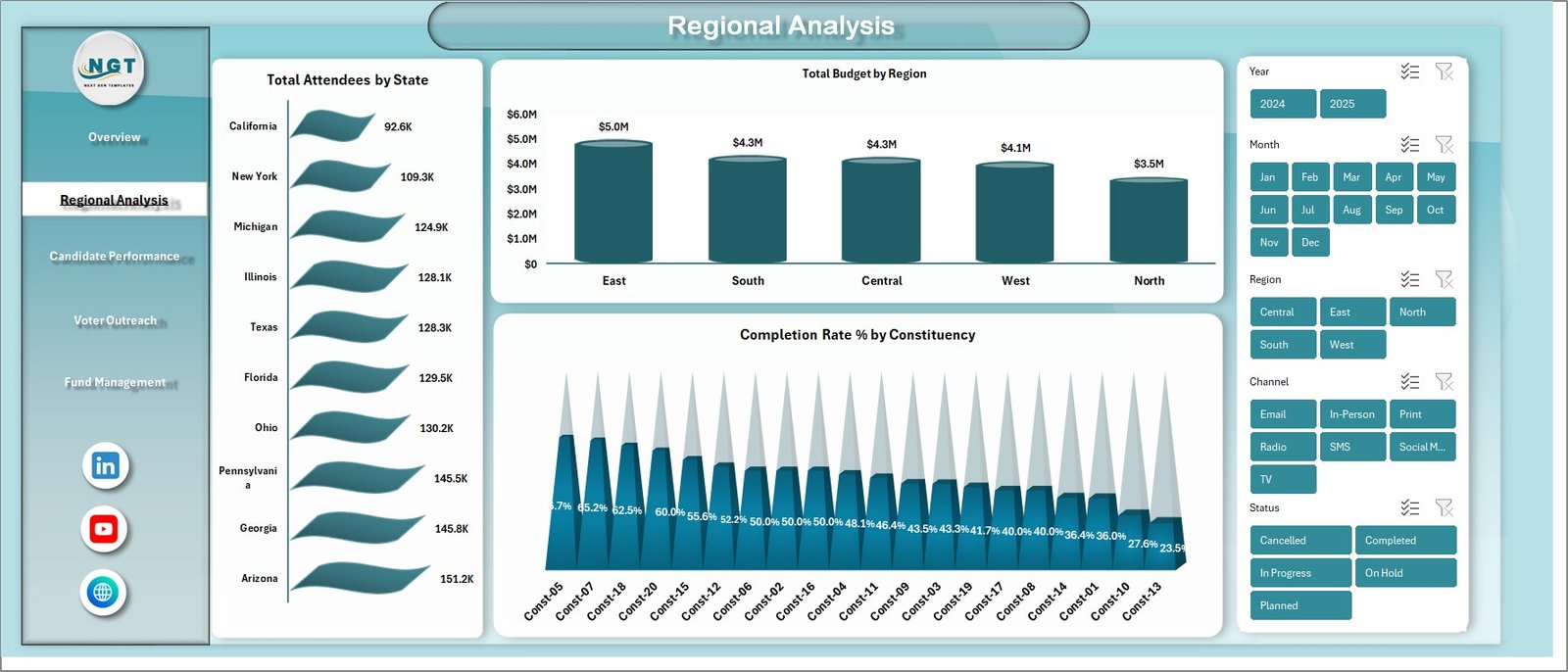
2. Regional Analysis — A geographic deep-dive page covering Total Attendees by State, Total Budget by Region, and Completion Rate % by Constituency. Use this page to identify which states are over-performing, which regions need more budget, and which constituencies are still behind on planned outreach milestones. This is where you make the call to redirect resources mid-cycle.
Candidate Performance
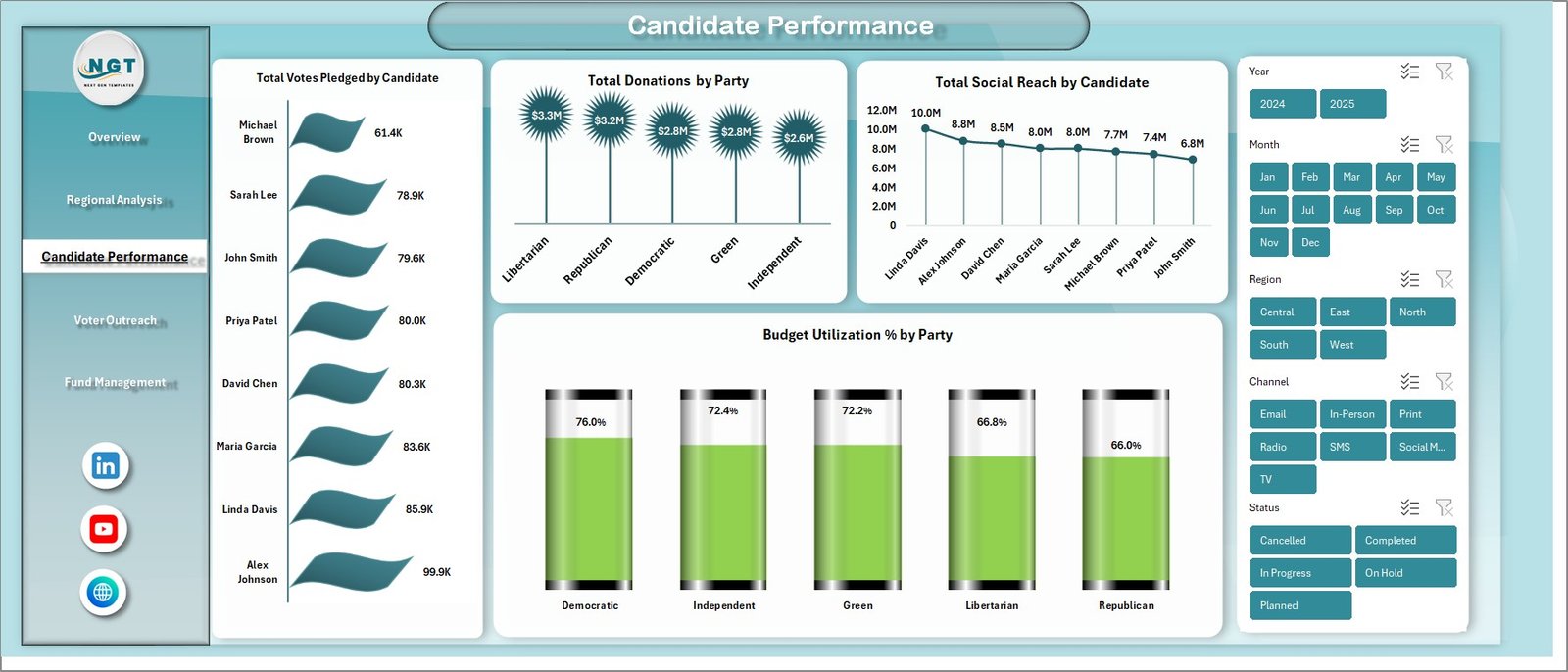
3. Candidate Performance — Evaluate individual candidates side-by-side with Total Votes Pledged by Candidate, Total Donations by Party, Total Social Reach by Candidate, and Budget Utilization % by Party. This page is the one party leadership stares at every Monday — it tells you which candidates resonate with voters, which are spending efficiently, and which need a strategic intervention before runoff.
Voter Outreach
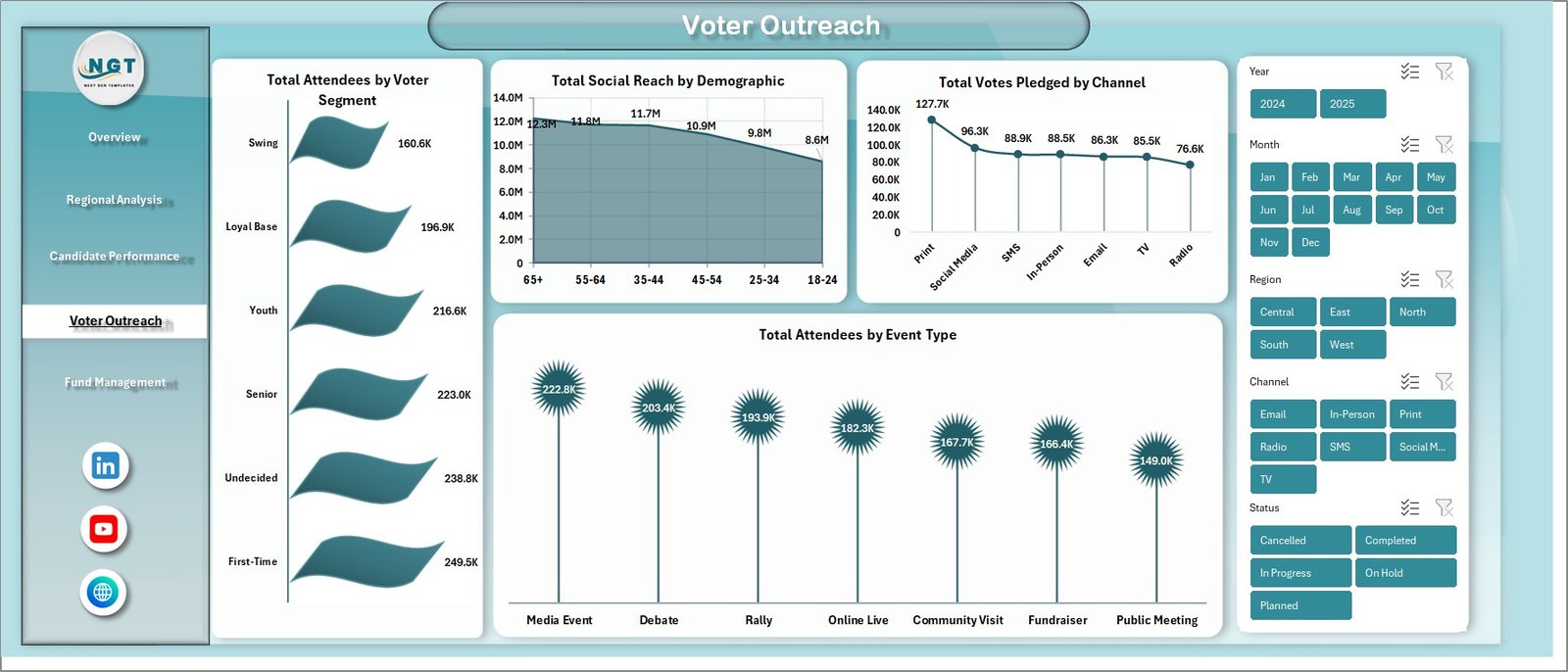
4. Voter Outreach — Four charts focused on the engagement mechanics: Total Attendees by Voter Segment, Total Social Reach by Demographic, Total Votes Pledged by Channel, and Total Attendees by Event Type. Use this page to optimize tactic-level decisions — door-knocking vs. town halls vs. social ads — based on which channels and demographics convert reach into pledged votes.
Fund Management
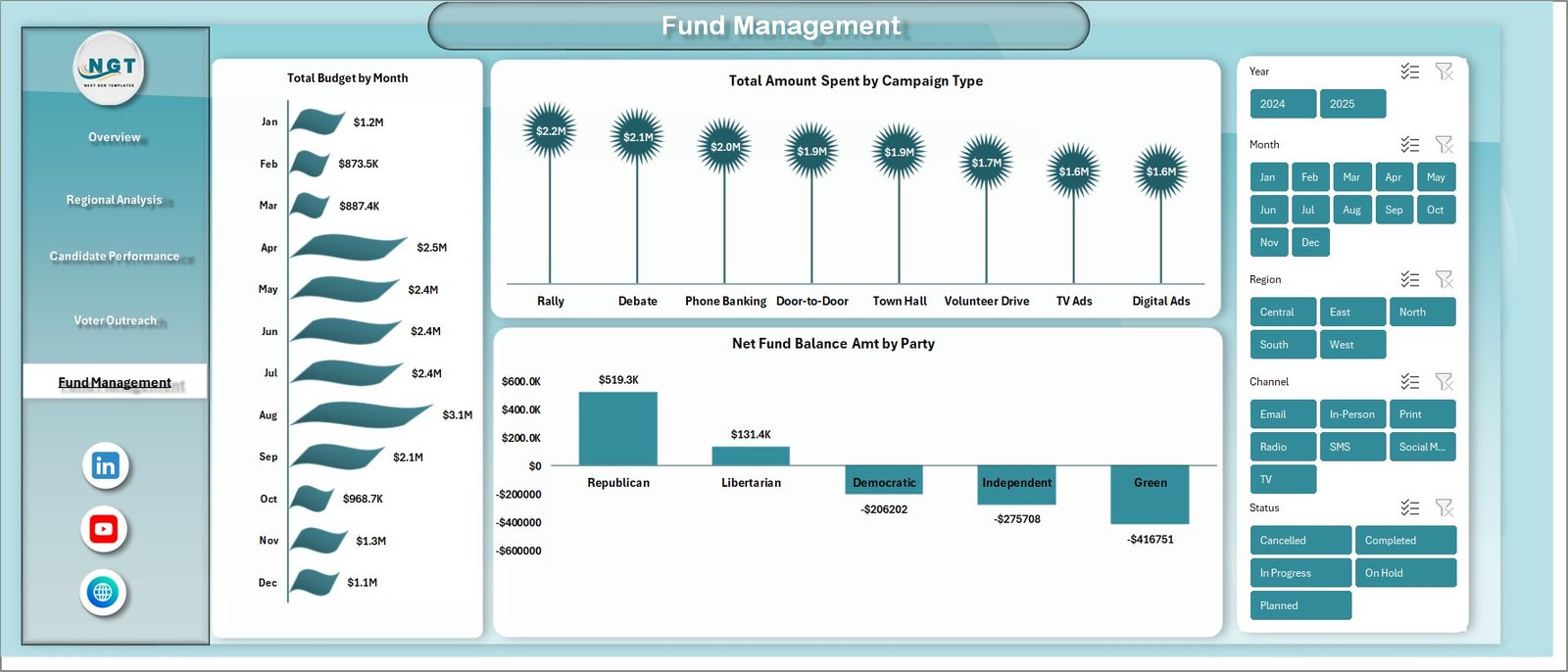
5. Fund Management — The treasurer’s page. Three charts cover Total Budget by Month, Total Amount Spent by Campaign Type, and Net Fund Balance Amt by Party. Spot overspending early, defend audit-ready budgets, and assemble the numbers you need for FEC quarterly filings or your country’s equivalent regulatory disclosure.

Data Sheet tab
6. Data Sheet — The single source of truth where you replace the sample rows with your real campaign records. Pre-populated headers cover campaign, candidate, party, region, state, constituency, voter segment, event type, channel, attendees, budget, amount spent, donations, and votes pledged. Keep the column headers exactly as they are — pivot tables reference them by name.

Support sheet tab
7. Support Sheet — Houses every pivot table that powers the dashboard. After updating the Data Sheet, click Data → Refresh All in the Excel ribbon and every pivot, chart, and slicer on every page rebuilds automatically. You can keep this sheet hidden during day-to-day use for a clean, distraction-free workbook.
Political Campaign Dashboard in Excel vs. Google Sheets vs. NGP VAN / NationBuilder — Feature Comparison
| Feature | Political Campaign Dashboard in Excel | Google Sheets equivalent | NGP VAN / NationBuilder / Salesforce for Nonprofits |
|---|---|---|---|
| Cost | $17.99 one-time | $14.99 – $19.99 one-time | $50 – $500+ per month |
| Platform | Microsoft Excel (Windows, Mac, web) | Google Sheets (browser only) | Hosted SaaS only |
| Setup time | Under 10 minutes | Under 10 minutes | 2 – 8 weeks onboarding |
| Works offline | ✅ Yes | ❌ Browser required | ❌ Cloud only |
| Multi-user real-time editing | Via OneDrive / SharePoint | ✅ Native | ✅ Native |
| Customizable parties & constituencies | ✅ Fully editable | ✅ Fully editable | Limited (vendor schema) |
| Voter file integration | Manual import | Manual import | Native (state voter files) |
| Year-1 cost at 5 users | $17.99 total | ~$15 total | $3,000 – $30,000+ |
| Best for | Local, state, party operations, consultants | Distributed field teams | National presidential campaigns |
For local, state, and party-level campaigns that need clear analytics across regions, candidates, and budgets without paying $3,000+ per year for a hosted political CRM, the Political Campaign Dashboard in Excel sits in the sweet spot.
Who Should Use This Template
✅ Perfect for:
- Local council, mayoral, state assembly, and parliamentary campaign managers running a single race or a multi-constituency operation.
- State and national party organizers tracking 10–50 candidates simultaneously across regions.
- Field directors managing voter outreach across constituencies, events, and demographics.
- Campaign treasurers monitoring budgets, donations, and net fund balance for FEC, ECI, or equivalent regulatory filings.
- Political consultants delivering monthly performance reporting to multiple candidate and PAC clients.
❌ Not a fit if:
- You are running a national presidential campaign with 1M+ voter records — use NGP VAN, NationBuilder, or a custom data warehouse.
- You need real-time multi-user editing across 10+ field staff editing the same dataset simultaneously — consider the Google Sheets edition.
- You need automated SMS or email blast capability — this is an analytics dashboard, not an outreach CRM.
Real-World Use Cases
🔹 State Assembly Campaign Manager. Sarah is running a 12-constituency state assembly campaign in the Midwest. Every Sunday night she pastes the previous week’s outreach data into the Data Sheet, hits Refresh All, and the Voter Outreach page tells her that Total Social Reach by Channel shows Instagram outperforming Facebook 3-to-1 among the 18–34 voter segment. She redirects $4,000 of social-ad spend from Facebook to Instagram, lifting Total Votes Pledged by 18% in the final 30 days of the cycle.
🔹 State Party Organizer. The state Democratic party tracks Total Donations by Party and Budget Utilization % by Party across 47 candidates. The Candidate Performance page surfaces 3 candidates burning budget faster than donations come in. Leadership uses that flag to redirect treasury support and put two of those candidates on a tighter weekly cash-flow review before runoff weeks.
🔹 Campaign Treasurer. Marcus is the treasurer for a congressional campaign. He uses the Fund Management page to monitor Net Fund Balance Amt by Party and Total Amount Spent by Campaign Type. The audit-ready monthly view cuts his FEC quarterly filing prep from 6 hours to 90 minutes — and during October reconciliation, the dashboard caught a $2,300 vendor overcharge that would otherwise have gone unnoticed until the post-election audit. For more event-focused tracking, he also uses the Event Management Analysis Dashboard in Excel alongside this one.
Advantages of Political Campaign Dashboard in Excel
The biggest single advantage is cost-versus-capability. A typical political CRM like NGP VAN or NationBuilder runs anywhere from $3,000 to $30,000 per year depending on seat count and add-ons. This dashboard delivers about 80% of the analytics value those tools provide for a one-time $17.99 purchase. That 80% is the part most campaign managers actually use day-to-day — KPI snapshots, cross-cut filtering, and budget tracking.
The second advantage is portability. Because it is a standard .xlsx file, you can email it, print it, paste it into a board pack, or hand it off to an incoming campaign manager during transitions. There is no vendor lock-in, no admin account to transfer, and no exit data extraction process. You own the file.
The third advantage is auditability. Every number on the dashboard traces back to a specific row on the Data Sheet. When a journalist or compliance officer asks “where did that number come from?”, you can answer in seconds — which is increasingly important under stricter campaign-finance disclosure rules in the U.S., U.K., India, Canada, and the EU.
Opportunities for Improvement
This template is a reporting layer, not an outreach engine. It does not import voter files automatically, send SMS or email blasts, or integrate natively with payment processors like ActBlue or WinRed. If you need any of those capabilities, you will pair this dashboard with a dedicated tool for that one job rather than replacing the dashboard.
Slicers in Excel for the web behave with some limitations compared to the desktop client — the visual experience is best in Excel desktop on Windows or Mac. And because the workbook is a single file, simultaneous multi-user editing requires saving on OneDrive or SharePoint with Excel co-authoring; pure local-disk multi-user editing is not supported.
Best Practices
Update the Data Sheet on a fixed weekly cadence — Sundays work well so the dashboard is fresh for Monday leadership reviews. Keep column headers exactly as they ship — pivot tables reference them by name, so renaming will break the workbook. Save a versioned copy each Friday (e.g. PoliticalCampaign_2026-W18.xlsx) so you have a clean weekly audit trail. And use the slicers to slice before presenting — leadership absorbs filtered views (single party, single state) much faster than the full dashboard.
Explore Relevant Templates
If this template is useful for you, also consider:
🔹 Event Management Analysis Dashboard in Excel — Pair it with the Political Campaign Dashboard to manage rallies, town halls, and campaign event logistics end-to-end.
🔹 Fundraising Campaign KPI Dashboard in Google Sheets — Cross-platform option for fundraising-heavy campaigns that prefer Google Sheets.
🔹 Charity Fundraising KPI Scorecard in Google Sheets — Traffic-light scorecard for non-profit and PAC fundraising performance.
🔹 Browse all Excel Dashboard Templates across 50+ industries.
Frequently Asked Questions
What KPIs does the Political Campaign Dashboard in Excel track?
The Political Campaign Dashboard in Excel tracks 5 headline KPIs on the Overview page — Total Campaigns, Total Attendees, Total Budget, Total Donations, and Total Votes Pledged — plus 14+ supporting charts covering Budget Utilization %, Total Social Reach by Channel and Demographic, Completion Rate % by Constituency, Net Fund Balance Amt by Party, and Total Amount Spent by Campaign Type.
How does this compare to NGP VAN or NationBuilder?
NGP VAN and NationBuilder are full political CRMs costing $3,000–$30,000 per year with multi-week onboarding. The Political Campaign Dashboard in Excel is a $17.99 one-time purchase you own outright. It covers analytics and reporting for 80% of campaigns but does not include voter-file integration, automated outreach, or payment processing — pair it with a dedicated CRM for those.
How long does setup take for this Excel campaign dashboard?
Setup takes under 10 minutes. Open the file, replace the sample rows in the Data Sheet with your own campaign records keeping the column headers intact, then click Data → Refresh All. Every chart, KPI card, and slicer across all 5 dashboard pages updates automatically.
Can I use this template for non-U.S. political campaigns?
Yes. The Political Campaign Dashboard in Excel is region-agnostic. Replace U.S.-specific labels (states, parties, constituencies) with your country’s political structure — UK constituencies, Indian Lok Sabha seats, Canadian ridings, Australian electorates. The pivot tables auto-adapt to whatever geographic and party labels you enter on the Data Sheet.
Does this template work in Excel for Mac and Excel for the web?
Yes. The Political Campaign Dashboard in Excel works on Microsoft Excel for Windows, Mac, and Excel for the web (Microsoft 365). Pivot tables, slicers, and charts function on all three platforms because the workbook uses native Excel features only — no macros, no add-ins, no internet connection required.
Can I customize the parties, candidates, and event types in this dashboard?
Yes. The Political Campaign Dashboard in Excel is fully dynamic and pivot-driven. When you enter your own party names, candidate names, constituencies, voter segments, event types, and social channels in the Data Sheet, every chart and KPI card automatically reflects your unique campaign data after you click Refresh All.
Is this dashboard suitable for FEC reporting and audit purposes?
Yes. The Fund Management page tracks Total Budget by Month, Total Amount Spent by Campaign Type, and Net Fund Balance Amt by Party — all sourced from the Data Sheet. You can export individual pages as PDFs to support FEC quarterly filings, treasurer reports, and internal audits. Keep a separate audit log of source documents alongside this dashboard for full compliance.
About the Author
Built by PK — Microsoft Certified Professional with 15+ years of Excel, Google Sheets, and Power BI experience. Founder of NextGenTemplates, reaching 300K+ subscribers across YouTube channels (@PK-AnExcelExpert, @NextGenTemplates, @NeoTechNavigators). Every template is hand-built and tested before release.
Conclusion
The Political Campaign Dashboard in Excel is the fastest way to consolidate campaigns, candidates, parties, donations, voter outreach, and fund management into one decision-ready Excel file — without paying $3,000+ a year for a hosted political CRM. Five interactive pages, five headline KPIs, 14+ pivot-powered charts, multiple slicers per page, and a single Data Sheet that drives the entire workbook on Refresh All.
👉 Click here to Purchase the Political Campaign Dashboard in Excel
✅ Instant download · One-time payment · No subscription · Lifetime access
🎥 Visit our YouTube channel for step-by-step video tutorials: YouTube.com/@PK-AnExcelExpert