Part of the free Module 5: Excel Formulas and Functions · Function 67 of 105 · Full Excel course
The Excel OFFSET function returns a reference to a cell or range that is a given number of rows and columns away from a starting cell, optionally resized to a chosen height and width. OFFSET in Excel is the classic way to build dynamic ranges that grow with your data, feed charts and drive rolling averages.
OFFSET syntax
=OFFSET(reference, rows, cols, [height], [width])Arguments
| Argument | Required | Meaning |
|---|---|---|
| reference | Required | The starting cell or range, for example A1. |
| rows | Required | How many rows to move down (positive) or up (negative) from reference. |
| cols | Required | How many columns to move right (positive) or left (negative). |
| height | Optional | Number of rows in the returned range. Defaults to the height of reference. |
| width | Optional | Number of columns in the returned range. Defaults to the width of reference. |
OFFSET returns a reference, not a value, which is why it can be wrapped in SUM, AVERAGE or used as a chart series. OFFSET is volatile: it recalculates on every change in the workbook.
Step-by-step example
Suppose a monthly sales list starts in A1 with a header and values in B2:B13. To return the value 3 rows down and 1 column right of A1:
=OFFSET(A1, 3, 1)- Excel starts at A1.
- It moves down 3 rows to A4, then right 1 column to B4.
- Because height and width are omitted, it returns the single cell B4.
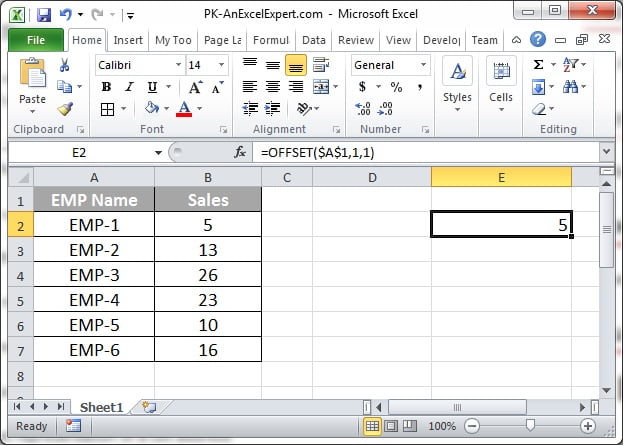
The screenshot below shows OFFSET moving from an anchor cell by a given number of rows and columns to return the target value.
Practical use cases
1. Sum a range of variable length
=SUM(OFFSET(B2, 0, 0, COUNTA(B:B)-1, 1))The height comes from COUNTA, so new rows are included automatically.
2. Rolling 3-month average of the latest data
=AVERAGE(OFFSET(B1, COUNTA(B:B)-3, 0, 3, 1))3. Dynamic named range for a chart or data validation list
=OFFSET(Sheet1!$A$2, 0, 0, COUNTA(Sheet1!$A:$A)-1, 1)Define this in Name Manager and point the chart series or drop-down at the name.
4. Return the nth value chosen by a cell
=OFFSET($B$1, $E$1, 0)Type 5 in E1 and the formula returns B6 (the 5th month).
Common mistakes and errors
- #REF! – the offset points outside the worksheet, for example OFFSET(A1, -1, 0). Check negative offsets and heights.
- #VALUE! – height or width is 0, negative or text.
- Slow workbook – OFFSET is volatile and recalculates constantly. In large models prefer INDEX, which is not volatile:
=SUM(B2:INDEX(B:B, COUNTA(B:B)))gives the same dynamic range. - Off-by-one errors – rows and cols count moves, not positions. OFFSET(A1, 0, 0) is A1 itself.
- Trace Precedents does not work – references built by OFFSET are invisible to formula auditing. Document them clearly.
Tips and best practices
- Prefer Excel Tables for growing data. A Table column such as Sales[Amount] expands automatically without any OFFSET.
- Keep OFFSET inside a defined name when you need it for charts or validation lists; one volatile formula is manageable, hundreds are not.
- Never use OFFSET(A1, -1, …) from the top row; negative offsets that leave the sheet return #REF!.
- Document the intent in a comment or adjacent cell, because Trace Precedents cannot follow OFFSET references.
- Switch to INDEX (B2:INDEX(B:B, COUNTA(B:B))) in large models; it produces the same dynamic range without volatility.
Related functions
- INDEX – the non-volatile alternative for dynamic ranges.
- INDIRECT – builds references from text.
- MATCH – supplies the row or column count that OFFSET needs.
- ADDRESS and ROW – other reference helpers.
- Browse the Excel Formulas hub.
Frequently asked questions
What does the OFFSET function return?
A reference to a cell or range located a set number of rows and columns from a starting point. On its own it displays the value of that cell; inside SUM or AVERAGE it supplies the range.
Why is OFFSET considered slow?
It is a volatile function, so Excel recalculates every OFFSET formula whenever anything in the workbook changes. A few are harmless; thousands can make large files sluggish.
What is the difference between OFFSET and INDEX?
Both can build dynamic ranges. OFFSET moves relative to a starting cell and is volatile; INDEX returns a reference by position within a range and is not volatile, so it is usually preferred in big models.
Need a ready-made template? Browse 7,000+ Excel, Power BI and Google Sheets templates at NextGenTemplates.com.