Part of the free Module 5: Excel Formulas and Functions · Function 26 of 105 · Full Excel course
The Excel EOMONTH function returns the last day of the month that is a specified number of months before or after a start date. With 0 as the second argument it gives the end of the current month. Because the result is a real date serial number, EOMONTH is the standard building block for period-end dates, month groupings, days-in-month counts and first-of-month calculations.
Syntax
=EOMONTH(start_date, months)Arguments
| Argument | Required / Optional | Meaning |
|---|---|---|
| start_date | Required | The reference date: a date cell, TODAY(), a DATE result or recognisable date text. |
| months | Required | Months to move. 0 returns the end of the start date’s month, positive values move forward, negative values move back. Decimals are truncated. |
How EOMONTH works
EOMONTH shifts the month by the number given, then replaces the day with the last day of that month, correctly handling 28, 29, 30 and 31-day months and leap years. =EOMONTH("2026-09-04",0) returns 30 September 2026, =EOMONTH("2026-09-04",-1) returns 31 August 2026 and =EOMONTH("2026-01-15",1) returns 28 February 2026. Adding 1 to any EOMONTH result gives the first day of the following month. The result needs a date format; invalid dates return #VALUE!.
Step-by-step example
The screenshot shows EOMONTH applied to a list of dates with different month offsets.
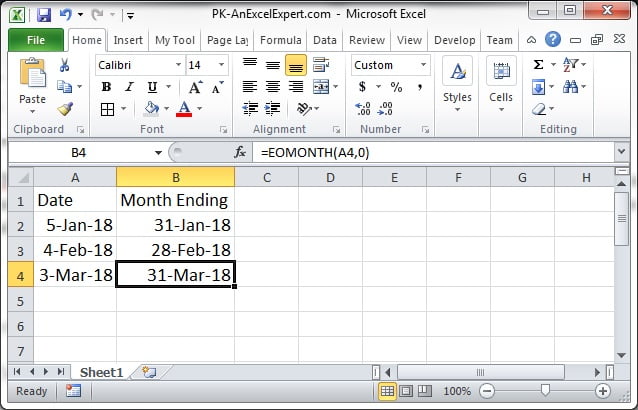
- Enter dates in column A, starting at A2, for example 4 September 2026.
- In B2 enter
=EOMONTH(A2,0). After applying a date format, B2 shows 30/09/2026. - In C2 enter
=EOMONTH(A2,1)for the end of next month (31/10/2026) and in D2=EOMONTH(A2,-1)for the end of last month (31/08/2026). - Fill the three formulas down. Every row now has its own period boundaries.
Practical use cases
1. First day of the month
=EOMONTH(A2,-1)+12. Number of days in a month
=DAY(EOMONTH(A2,0))3. Invoice due at the end of the following month
=EOMONTH(InvoiceDate,1)The standard “net 30 end of month” payment term in one function.
4. Quarter-end date
=EOMONTH(A2,2-MOD(MONTH(A2)-1,3))Moves forward 0, 1 or 2 months to the last month of the quarter and returns its final day.
5. Month totals with SUMIFS
=SUMIFS(Sales,Dates,">="&EOMONTH(E2,-1)+1,Dates,"<="&EOMONTH(E2,0))E2 holds any date in the month; the two EOMONTH expressions define its first and last day.
Common mistakes and tips
- Result shows as a number: EOMONTH returns a serial number; apply a date format.
- Confusing months = 1 with the current month: 0 is the current month end, 1 is next month.
- Time portions: EOMONTH drops any time, so the result is always midnight on the last day.
- #VALUE! error: start_date is text Excel cannot read as a date, or months is non-numeric.
- Fiscal years: for a year ending in March, the fiscal year-end is
=EOMONTH(A2,MOD(3-MONTH(A2),12)).
EOMONTH compared with EDATE and DATE
EDATE shifts a date by months but keeps the day of the month, while EOMONTH shifts by months and snaps to the last day. Both accept the same arguments, so they are easy to swap: use EDATE for anniversaries and instalments, EOMONTH for period boundaries. The DATE function can produce the same results with more typing, for example =DATE(YEAR(A2),MONTH(A2)+1,0) for the current month end, but EOMONTH is shorter and clearer. In PivotTables, grouping by month achieves a similar effect without formulas; EOMONTH is preferred in SUMIFS, dashboards and data models where an explicit period-end column is needed for lookups and charts.
Related functions
- EDATE: shifts a date by months without snapping to month end.
- DAY: reads the day number from an EOMONTH result.
- DATE: builds dates from parts with day rollover.
- NETWORKDAYS: counts working days between month boundaries.
- See all lessons in the Excel Formulas course.
Frequently asked questions
How do I get the first day of the month with EOMONTH?
Use =EOMONTH(A2,-1)+1. It returns the last day of the previous month and adds one day.
What is the difference between EOMONTH and EDATE?
Both move a date by a number of months. EOMONTH returns the last day of the resulting month; EDATE keeps the original day of the month.
Why does EOMONTH return a number like 46295?
That is the serial number of the date. Apply a date format to the cell and it displays as 30/09/2026.
Need a ready-made template? Browse 7,000+ Excel, Power BI and Google Sheets templates at NextGenTemplates.com.