Part of the free Module 5: Excel Formulas and Functions · Function 20 of 105 · Full Excel course
The Excel DATEVALUE function converts a date stored as text, such as “4 September 2026” or “2026-09-04”, into the serial number Excel uses for real dates. Once converted, the value can be sorted, filtered, subtracted and used in DAY, MONTH, YEAR or NETWORKDAYS. DATEVALUE is the fix for imported dates that sit left-aligned in a column and refuse to calculate.
Syntax
=DATEVALUE(date_text)Arguments
| Argument | Required / Optional | Meaning |
|---|---|---|
| date_text | Required | Text that represents a date in a format Excel recognises under your regional settings, or a reference to a cell containing such text. Dates from 1 January 1900 to 31 December 9999 are accepted. |
How DATEVALUE works
DATEVALUE parses the text using the Windows or Mac date settings, so “09/04/2026” is 4 September on a US system and 9 April on a UK system, while “2026-09-04” and “4-Sep-2026” are read the same way everywhere. If the year is missing, the current year is used. Any time portion in the text is ignored, so “2026-09-04 15:30” returns the date only. The result is a serial number such as 46269; apply a date format to display it. Text Excel cannot parse returns #VALUE!.
Step-by-step example
The screenshot shows DATEVALUE converting text dates in column A into real dates.
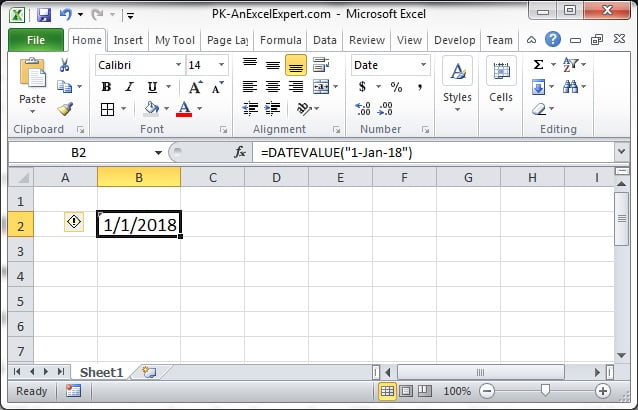
- Column A holds dates exported as text, for example
04-Sep-2026. They align left and SORT treats them alphabetically. - In B2 enter
=DATEVALUE(A2). The result is 46269. - Select column B and apply a date format. The cell now shows 04/09/2026 and aligns right, confirming it is a number.
- Fill down, then copy and paste as values over column A if the text column is no longer needed.
Practical use cases
1. Dates with full stops or unusual separators
=DATEVALUE(SUBSTITUTE(A2,".","/"))Converts 04.09.2026 by first swapping the separators for ones Excel recognises.
2. Date and time text into a full timestamp
=DATEVALUE(A2)+TIMEVALUE(A2)DATEVALUE drops the time and TIMEVALUE drops the date; adding them rebuilds the complete value.
3. Build a date from separate text parts
=DATEVALUE(C2&"/"&B2&"/"&A2)Joins day, month and year text into a string that DATEVALUE can parse. For numeric parts, DATE is simpler.
4. Compare a text date with today
=IF(DATEVALUE(A2)<TODAY(),"Expired","Valid")5. Safe conversion of a mixed column
=IFERROR(DATEVALUE(A2),IF(ISNUMBER(A2),A2,""))Converts text dates, leaves real dates as they are and blanks anything unreadable.
Common mistakes and tips
- #VALUE! error: the text is not a recognisable date, or day and month are in the wrong order for your locale. Use DATE with LEFT, MID and RIGHT when the source order is fixed and differs from your system.
- Result shows a number: apply a date format; the conversion is already correct.
- Two-digit years: “04/09/26” is read as 2026, but years 30 to 99 become 1930 to 1999. Supply four-digit years where possible.
- Real dates as input: DATEVALUE(A2) returns #VALUE! when A2 already holds a real date. Use IFERROR or check with ISTEXT first.
- Bulk conversion: Data > Text to Columns with the Date option converts a whole column in place without formulas.
DATEVALUE compared with VALUE and DATE
VALUE also converts text dates and additionally handles numbers, times and currency, so =VALUE("04-Sep-2026") gives the same 46269. DATEVALUE is preferred when the intention is specifically a date, because it ignores any time component and makes the formula self-explanatory. DATE is the right choice when the parts are already numbers or can be extracted reliably with text functions, and it is immune to regional settings. Power Query handles large imports best: its Change Type with Locale step converts text dates from any country in one click and repeats automatically on refresh.
Related functions
- DATE: builds a date from numeric year, month and day.
- TIMEVALUE: converts a text time to a serial time.
- VALUE: converts any numeric text, including dates.
- TEXT: the reverse operation, date to formatted text.
- See all lessons in the Excel Formulas course.
Frequently asked questions
Why does DATEVALUE return #VALUE!?
The text does not match a date format Excel recognises in your regional settings, or the cell already contains a real date. Fix the separators with SUBSTITUTE or use DATE with LEFT, MID and RIGHT.
Why does DATEVALUE show a number like 46269?
That is the correct serial number for the date. Apply a date format to the cell to display it as a date.
Does DATEVALUE keep the time part of a text string?
No. It returns the date only. Add TIMEVALUE of the same text to keep the time.
Need a ready-made template? Browse 7,000+ Excel, Power BI and Google Sheets templates at NextGenTemplates.com.