Part of the free Module 5: Excel Formulas and Functions · Function 79 of 105 · Full Excel course
The Excel SUMIF function adds the numbers in a range that meet a single condition, such as all sales for one region or every invoice above a limit. SUMIF in Excel returns one total; rows that fail the test are ignored. For two or more conditions at once, use its sibling SUMIFS.
SUMIF syntax
=SUMIF(range, criteria, [sum_range])Arguments
| Argument | Required | Meaning |
|---|---|---|
| range | Required | The cells to test against the criteria. |
| criteria | Required | The condition: a number (500), text (“East”), a comparison in quotes (“>500”, “<>Cancelled”), a wildcard (“Lap*”) or a reference (“>”&G1). |
| sum_range | Optional | The cells to add. If omitted, Excel adds the cells in range itself. |
Note that in SUMIF the sum range is the last argument, whereas SUMIFS puts it first.
Step-by-step example
A sales sheet has Region in A2:A50 and Amount in C2:C50. To total the East region:
=SUMIF(A2:A50, "East", C2:C50)- Excel checks each cell in A2:A50 for the text “East” (not case-sensitive).
- For every match it notes the Amount in the same row of C2:C50.
- It adds those amounts and returns the total.
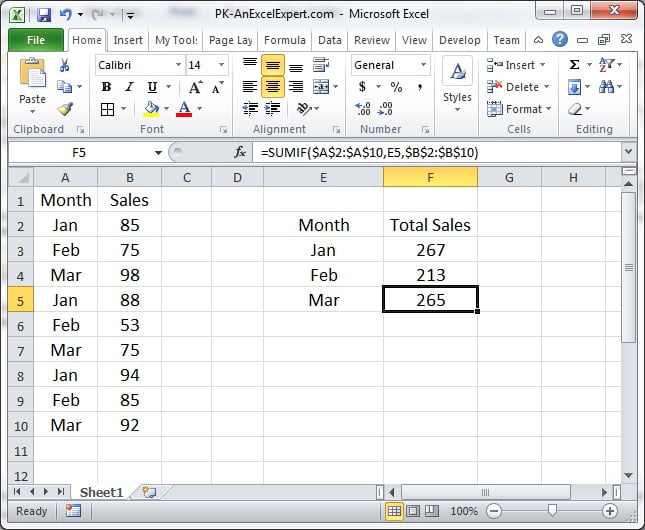
The screenshot below shows SUMIF totalling a value column for a single criterion taken from the data table.
Practical use cases
1. Sum values above a threshold (no sum_range needed)
=SUMIF(C2:C50, ">1000")2. Criteria from a cell
=SUMIF($A$2:$A$50, F2, $C$2:$C$50)Put region names in column F and fill down to build a summary table.
3. Wildcards for partial text
=SUMIF(B2:B50, "*Pro*", C2:C50)* matches any characters, ? matches one. “Lap*” totals every product starting with Lap.
4. Dates before today
=SUMIF(D2:D50, "<"&TODAY(), C2:C50)5. Exclude one category
=SUMIF(E2:E50, "<>Cancelled", C2:C50)6. Sum blanks or non-blanks
=SUMIF(A2:A50, "", C2:C50)      -- rows where A is empty
=SUMIF(A2:A50, "<>", C2:C50)    -- rows where A is filled
Common mistakes and errors
- Result is 0 – numbers stored as text in sum_range, trailing spaces in range, or criteria typed without quotes around an operator. Use TRIM and VALUE, and write “>500” not >500.
- #VALUE! – usually caused by a criteria string longer than 255 characters, or a reference to a closed workbook. SUMIF cannot read closed files; SUMPRODUCT can.
- Different-sized ranges – SUMIF uses the top-left cell of sum_range and extends it to match range. This works but is confusing; keep both ranges the same size.
- Trying two conditions – SUMIF accepts one. Use SUMIFS, or add two SUMIFs for OR logic.
- Case sensitivity – SUMIF ignores case. Use SUMPRODUCT with EXACT if case matters.
Tips and best practices
- Put criteria in a cell and reference it. A summary table with categories down one column becomes a single SUMIF filled down.
- Use SUMIFS even for one condition in new work; the argument order is consistent and a second criterion can be added later.
- Combine SUMIF with wildcards for categories such as “Region*” to total every sub-region at once.
- Check totals against a manual filter before trusting a report; a mismatch nearly always means text-formatted numbers.
- Use an Excel Table so the formula reads SUMIF(Sales[Region], F2, Sales[Amount]) and grows with the data.
Related functions
- SUMIFS – multiple conditions.
- COUNTIF – counts instead of sums with the same criteria rules.
- AVERAGEIF – conditional average.
- SUMPRODUCT – conditional sums with OR logic or calculations.
- Browse the Excel Formulas hub.
Frequently asked questions
What is the difference between SUMIF and SUMIFS?
SUMIF handles exactly one condition and takes the sum range last. SUMIFS handles up to 127 conditions, all of which must be true, and takes the sum range first.
How do I use a cell reference in the SUMIF criteria?
For an exact match, pass the cell directly: =SUMIF(A:A, F2, C:C). For a comparison, join the operator to the cell: =SUMIF(C:C, “>”&F2).
Can SUMIF use OR conditions?
Add two SUMIF results together, or use SUM(SUMIF(A2:A50, {“East”,”West”}, C2:C50)) to sum rows that match either value.
Need a ready-made template? Browse 7,000+ Excel, Power BI and Google Sheets templates at NextGenTemplates.com.