Part of the free Module 5: Excel Formulas and Functions · Function 78 of 105 · Full Excel course
The Excel SUBSTITUTE function replaces every occurrence of a specific text string inside a cell with new text, or only one chosen occurrence when you supply an instance number. It matches by content and is case-sensitive. SUBSTITUTE is the standard tool for cleaning imported data, swapping separators, removing unwanted characters and counting how often a character appears.
Syntax
=SUBSTITUTE(text, old_text, new_text, [instance_num])Arguments
| Argument | Required / Optional | Meaning |
|---|---|---|
| text | Required | The original text or cell reference. |
| old_text | Required | The text to be replaced. Matching is case-sensitive. |
| new_text | Required | The replacement text. Use an empty string to delete old_text. |
| instance_num | Optional | Which occurrence to replace, counted from the left. If omitted, every occurrence is replaced. |
How SUBSTITUTE works
SUBSTITUTE scans the text from left to right, finds each exact match of old_text and swaps it for new_text. If old_text is not present, the original text is returned unchanged, with no error. The result is always text, so a number that passes through SUBSTITUTE needs VALUE to become numeric again. Because matching is case-sensitive, =SUBSTITUTE("Excel excel","excel","Sheets") changes only the second word.
Step-by-step example
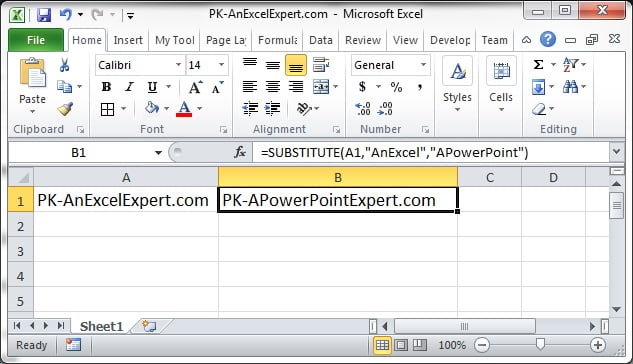
The screenshot shows SUBSTITUTE replacing characters in a list of text values.
- Type
2026-09-04in A2. - In B2 enter
=SUBSTITUTE(A2,"-","/"). Every hyphen becomes a slash:2026/09/04. - In C2 enter
=SUBSTITUTE(A2,"-","/",2). Only the second hyphen changes:2026-09/04. - In D2 enter
=SUBSTITUTE(A2,"-",""). All hyphens are removed:20260904. Wrap in VALUE if you need a number.
Practical use cases
1. Remove a currency symbol and convert to a number
=VALUE(SUBSTITUTE(SUBSTITUTE(A2,"$",""),",",""))2. Count how many times a character appears
=LEN(A2)-LEN(SUBSTITUTE(A2,",",""))The difference in length equals the number of commas removed.
3. Replace non-breaking spaces from web data
=TRIM(SUBSTITUTE(A2,CHAR(160)," "))4. Replace line breaks with a separator
=SUBSTITUTE(A2,CHAR(10),", ")5. Extract the text after the last separator
=TRIM(RIGHT(SUBSTITUTE(A2,"/",REPT(" ",100)),100))Each slash becomes 100 spaces, so the last 100 characters hold only the final segment.
Common mistakes and tips
- Nothing changes: the case does not match. SUBSTITUTE is case-sensitive; normalise with LOWER or UPPER first, or use REPLACE with SEARCH.
- Numbers behave unexpectedly: SUBSTITUTE works on the stored value, so a formatted date is treated as its serial number. Apply TEXT first.
- Result is text: wrap in VALUE for numeric output.
- Several replacements: nest one SUBSTITUTE inside another. For long lists of replacements, Excel 365 users can use REDUCE with LAMBDA, or Power Query.
- instance_num must be positive: zero or a negative number returns #VALUE!.
SUBSTITUTE compared with REPLACE and Find and Replace
SUBSTITUTE matches by content; REPLACE works by position and length. Use SUBSTITUTE when you know what the unwanted text is but not where it sits, and REPLACE when the position is fixed but the content varies. The ribbon’s Find and Replace command (Ctrl+H) performs a one-time, case-insensitive substitution across a whole sheet and changes the source cells permanently; SUBSTITUTE keeps the original data intact and updates automatically when it changes, which is essential in templates and dashboards fed by regular imports. For very large clean-ups that run on every refresh, Power Query’s Replace Values step performs the same job outside the grid and does not add formula overhead.
Related functions
- REPLACE: replaces by position instead of content.
- TRIM: removes surplus spaces after substitutions.
- CHAR: targets specific characters such as CHAR(10) and CHAR(160).
- LEN: combines with SUBSTITUTE to count occurrences.
- See all lessons in the Excel Formulas course.
Frequently asked questions
Is the SUBSTITUTE function case-sensitive?
Yes. SUBSTITUTE replaces only text that matches the exact case of old_text. Convert the text with LOWER or UPPER first if case should be ignored.
How do I replace only the second occurrence with SUBSTITUTE?
Supply the instance number as the fourth argument: =SUBSTITUTE(A2,”-“,”/”,2) changes only the second hyphen.
How do I remove a character completely with SUBSTITUTE?
Use an empty string as new_text: =SUBSTITUTE(A2,”,”,””) deletes every comma from the cell.
Need a ready-made template? Browse 7,000+ Excel, Power BI and Google Sheets templates at NextGenTemplates.com.